
French Dictation Practice: Separate Spelling Errors from Missed Meaning
Published on

If your French dictation comes back full of red, the useful next move is to sort each difference into spelling, a word you did not catch, or a word you never learned. A graded exercise on TV5MONDE's Dictée d'Archibald shows you the gap but not the cause. A human reply fits a later step: on HelloTalk you can reuse one checked phrase in a sentence of your own and ask a question a partner can answer, which tests whether your meaning landed rather than whether you transcribed correctly.
Run One Short Graded Dictation First
Dictée d'Archibald asks which profile you are before anything starts. The learner track offers A1, A2, B1, B2, C1 and C2, and those are separate from the Junior and Senior options aimed at people already comfortable in French. A difficulty label on a dictation exercise is a content setting, not a placement test, so choose the level where you can finish a short text in one sitting and still have energy to review it.
One concrete A1 exercise is Gaston y a le téléfon qui son, credited to Christian Rodier for the text, Zelda Zonk for the illustration and Alex Andréa for the reading. Its A1 version opens with two numbered entry areas, SÉQUENCE 1 and SÉQUENCE 2, a text box under each, a virtual keyboard for accented characters, and an audio control for the dictation. Not every exercise in the collection is built with exactly two sequences, so check what the page shows you before planning your time.
The title itself is a joke spelling. In ordinary written French those words are téléphone and sonne, so keep the playful version out of your notes as a model.
Before typing anything, decide that this single pass is the thing you will review. If you expect to edit afterwards, keep a copy of your first attempt, a screenshot or a quick retype in your notebook, so you can still compare it with the original text later.
If you are still working out where dictation sits next to reading and speaking practice, the wider French learning resource plan covers that ordering.
Use the Second-Chance Step If You Want Errors Flagged Before Correction
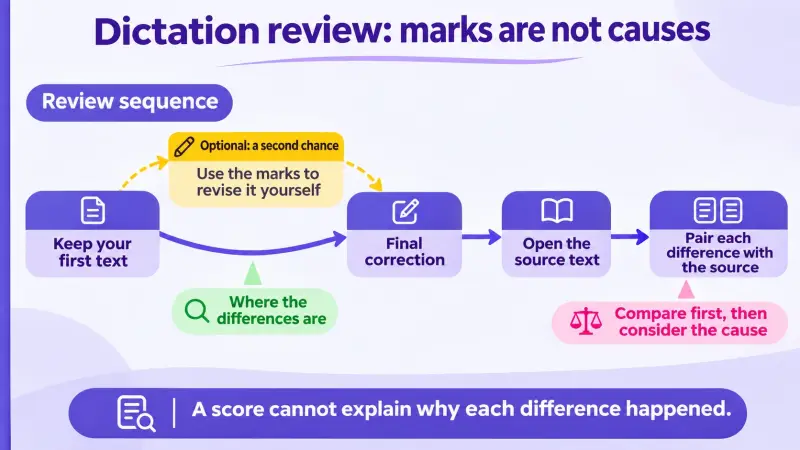
Once both boxes are filled, the page gives you a choice rather than sending you straight to a score. The controls are 2e CHANCE and OK, and they lead to different experiences of the same text.
The second-chance step marks places where something looks wrong. The official help explains that those marks stay in place while you edit, until you ask for the final correction. The second-chance step is optional, and skipping it leaves your first attempt as the version you review.
Use it when you want practice noticing your own accents and agreements, since spotting a flagged ending and fixing it is itself a useful habit. Skip it when you want a clean picture of what you produced without a second look. Either way, the flags tell you where a difference sits, not which kind of difference it is.
Compare Your Text With the Original Before You Judge Anything
Pressing OK gives you the correction and a mark. The source text sits behind its own control, VOIR LE TEXTE ORIGINAL, so reading what was actually dictated is a deliberate second step and not something that appears on its own.
The final mark summarizes how your text compared with the source, not why each difference happened. The help page separates error types in the scoring, including some that count as mistakes without lowering the final mark, which is another reason the number alone cannot stand in for a diagnosis. Treat it as a bookmark for the session.
Write each difference down as a pair: what you typed on one side, what the source has on the other. Three to six short pairs is plenty, and keeping it to pairs means you are not copying the whole passage into your notebook.
Check Each Miss: Spelling, a Word You Did Not Catch, or a Word You Do Not Know
With those pairs in front of you, three questions do most of the sorting. Looking at the source text, do you recognize the correct word on sight and know what it means? Was there anything at all in that spot when you typed, or a blank? Can you say what the sentence means without looking at the French?
Short illustrations help here, and these are written as examples rather than taken from the exercise.
If you typed il sone where the source has il sonne (it rings), and you recognize that word and its meaning on sight, the written form is the likely issue. If you typed elle a manger where the source has elle a mangé (she ate), the two endings sound alike, so the choice largely happens on paper.
If a short word like en is simply absent from your line, a reasonable first reading is that you did not catch it. Replay that short stretch once and check two things: whether you can hear it now, and whether the written word means anything to you. If every word matches but you still cannot restate the sentence in plain English, the typing was not where the problem sat.
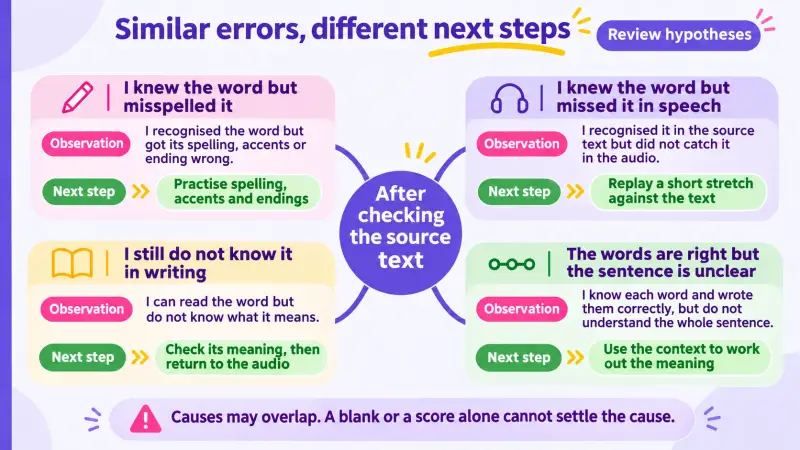
These readings are hypotheses, and they overlap more often than people expect. You can half-hear a word you also could not spell, or skip a word whose meaning you have never learned, so a typo or a blank on its own does not settle what happened.
Each finding points to a different next move. The division of work in this article is simple: the source text settles what was dictated, and the HelloTalk step comes afterwards with an expression you have already checked, used in a message of your own. Read the table down the first column until you find the case in front of you.
| What you find in your own text | Question to ask yourself | How to read it | What to do next |
|---|---|---|---|
| A word you know, written wrong (il sone for il sonne, it rings) | Do I recognize this word on sight and know what it means? | Most likely a written-form issue, including accents and silent endings | Redo the same text a day later and type the accents from the virtual keyboard on purpose |
| A verb ending that sounds the same (elle a manger for elle a mangé, she ate) | Would I pick the same ending writing from memory? | A written choice more than a hearing problem | Drill that one ending in a few short written sentences before more dictation |
| A blank or a non-word where a short word belongs (en, y, se) | Did I hear anything in that spot, and do I recognize the word in writing? | Possibly a word you did not catch, possibly one you do not know yet | Replay that short stretch once against the original; if you know the word and its meaning, a short dictation you can get through is a reasonable next step; if the meaning is still unclear, settle that first and come back to the audio |
| A word you cannot define even after reading the original | Do I know this word in any form, spoken or written? | New vocabulary, which can also explain why it slipped past in the audio | Look up or ask about the meaning, note one example sentence, then listen to that stretch again with the meaning in mind |
| All words match, meaning still unclear | Can I explain this sentence in plain English without looking? | A meaning gap, separate from transcription | Work out the sentence from its context and check the word or usage that is blocking it; once you can explain it, use one phrase of it in a HelloTalk message with a question the person can answer |
This sort is a review habit you run yourself, not a classification the exercise performs. Because causes overlap and a single mark cannot separate them, people end up replaying audio ten times when part of the problem was an ending they have never written by hand. When the gap is comprehension rather than written form, retelling a short French clip and handling a real response is the better shape of practice.
Pick the Next Exercise, Then Use Your Own Wording in a Separate HelloTalk Message
The point of sorting is that each category has an obvious follow-up. A page full of written-form slips means repeating the same text later with the accented keyboard in front of you, or staying at the same level with a new text and checking only endings.
Blanks on their own do not point to one follow-up. Where you know the written word and its meaning but did not pick it out in that recording, replay that stretch against the original and read it aloud, then take a next exercise you can get through. Where the meaning is still unclear, sort the word out first instead of choosing a level from how many blanks you see.
Words you do not know yet need a different track. Replaying helps when the sound was the obstacle, but when a stretch stays unclear after a few passes, look the word up or ask someone what it means, then return to the audio with that meaning in mind. Keep a short list with one example sentence each and choose your next text on a topic where those words come back. If they belong to telling a story, French resources for telling a past experience give that vocabulary somewhere to live.
Then there is the part a dictation cannot do for you. It checks whether you typed what was read. To find out whether you can use an expression yourself, take one phrase you just checked against the original and write your own sentence with it in a HelloTalk chat, as text or a voice message, followed by a question the person can answer from their own life.
Something like: Chez moi, le téléphone sonne toujours pendant le dîner. Et toi, tu réponds ou tu rappelles plus tard? In English that is roughly: at my place the phone always rings during dinner, and you, do you pick up or call back later? The question matters because an answer gives you something real to read that is connected to your own sentence.
A relevant reply shows what that person understood from your sentence, not that every spelling and ending in your dictation was right. Keep the two results apart instead of adding them together, and do not paste the source passage into a chat asking for a grade; people there are conversation partners, not a correction service on call.
HelloTalk's chat description covers text and voice messages, translation, correction tools and media sharing, so if someone retypes your phrase or corrects it in the thread, copy that wording into your own notes and reuse it in the next message you send. Building a sentence from a lesson first is covered in turning a French course lesson into a voice message.
FAQ: Reviewing French Dictation Misses
Is Dictée d'Archibald only for beginners?
No. The learner profile offers A1 through C2, and there are separate Junior and Senior options for people already comfortable in French. The label describes the material you get, not a measured level.
Should I always use the second chance?
It is optional. Use it when you want to practise spotting flagged accents and endings yourself; skip it, or keep a copy of your text first, when you want your original attempt preserved for review.
Does a low mark mean my listening is weak?
Not by itself. The mark compares your text with the source without saying why a difference appeared, and the scoring treats error types differently, including some counted as mistakes without lowering the final mark.
What should I do about accent mistakes?
Treat them as written-form practice. Use the virtual keyboard on the exercise page deliberately, note the exact pair you got wrong, and retype the same text a day or two later.
Can I ask a HelloTalk partner to check my dictation?
Better to ask about your own sentence. Reuse one phrase you have already checked against the original, write something of your own with it, and add a question your partner can answer, rather than sending the passage and asking for a score.
How many dictations should I do in one session?
One short one plus the review is usually enough. The sorting step is where the useful information is, so write your pairs down before moving on to a second text.
Should I copy the exercise title spelling into my notes?
No. Titles like Gaston y a le téléfon qui son use deliberate joke spelling; the standard written forms are téléphone and sonne.
Pick one short graded dictation this week, sort your misses into those categories, then take one checked phrase into a message of your own on HelloTalk and see what comes back.