
Best English Speaking Video Call Apps in 2026: Talk to Native Speakers Live
You can text in English all day. Your written messages are pretty good, you take your time, you check a word when you need to. Then a video call comes up, a job interview, a meeting with an overseas team, a chat with a friend abroad, and the whole thing changes. Now there is a face on the screen, a camera on you, and no time to think. You have to understand fast speech, form a reply, and say it out loud while someone watches. The skill you built in text does not transfer. Live video is its own thing, and the only way to get good at it is to do it, on camera, with real people.
That is exactly what an English speaking video call app is for. It puts you face to face with native or fluent speakers so you can build the specific muscle that text and quizzes never touch: talking in real time, on video, under a little bit of pressure. This guide compares the best video call apps for English practice in 2026, explains what actually makes one worth your time, and shows you how to get over the fear of the camera and start talking.
Why Video Practice Is Different From Every Other Kind
It is tempting to think that if you can text and send voice messages, video is just a small step further. It is not. Video call practice trains three things that nothing else does, and those three things are exactly what real-world English situations demand.
The first is real-time processing. On a video call there is no pause button. Someone speaks, and you have to understand and respond in the natural gap, which is a second or two, not the minute you would take to reply to a text. This ability to keep up with live speech is a separate skill, and it only develops by practicing live.
The second is reading faces and body language. A huge part of real conversation is non-verbal, the nod that means keep going, the frown that means you have not been understood, the smile that tells you a joke landed. Text strips all of that out. Video puts it back, and learning to read and respond to it is what makes you a natural conversationalist rather than someone reciting sentences.
The third is performing under the mild pressure of being seen. There is a real, useful nervousness to being on camera. It mimics the pressure of the actual situations you are preparing for, an interview, a presentation, a first meeting, so practicing on video builds the composure you need for those moments. You cannot rehearse that feeling any other way.
If you want the broader context on how live speaking fits into a complete practice plan, our guide on how to practice English speaking in 2026 puts video into the larger routine.
What Makes a Good English Speaking Video Call App
When you compare video call apps, five things separate the genuinely useful ones from the rest. Judge every option against this list.
-
Access to real native or fluent speakers. The whole point is talking with people who model natural English. An app full of other beginners, or full of bots, will not give you the real thing.
-
A low barrier to starting a call. Video is intimidating. The best apps let you warm up first, with audio-only options, group rooms, or the ability to keep your camera off until you are comfortable, so you can climb toward full video at your own pace.
-
A large, active user base. A video app is only as good as who is online right now. Scale is the difference between finding a partner in two minutes and staring at an empty screen.
-
Correction and follow-up tools. The call itself is the practice, but being able to save vocabulary, get a text correction afterward, or send a follow-up voice message multiplies what you learn from each conversation.
-
A cost model that lets you practice often. Fluency comes from frequency. An app that charges per minute or per lesson limits how much you can practice, so a free or flat-rate option often beats a pay-per-call one for sheer volume.
For a complete framework you can apply to any tool, our guide on how to choose an English speaking app turns these into a step-by-step checklist.
The Best English Speaking Video Call Apps in 2026
Here is how the leading options compare for the specific goal of live English practice on camera.
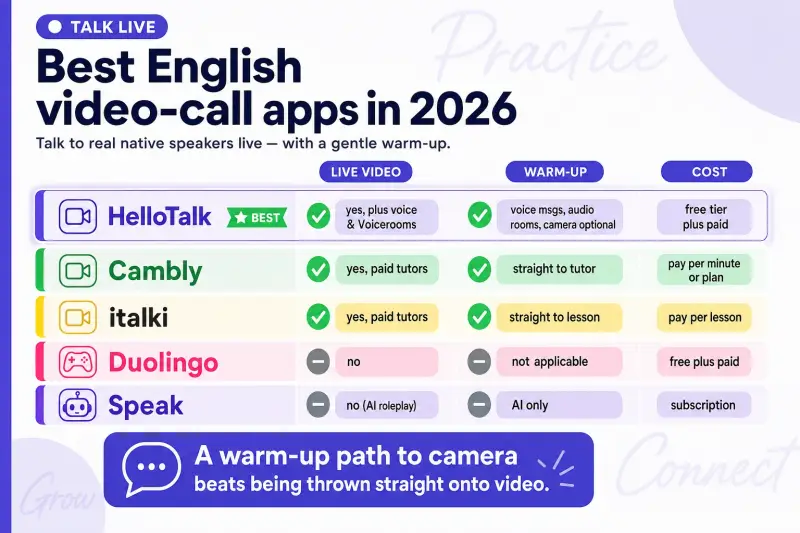
| App | Live video with real people | Warm-up options | Cost model | Best for |
|---|---|---|---|---|
| HelloTalk | Yes, plus voice and Voicerooms | Voice messages, audio rooms, camera optional | Free tier plus paid | Frequent live practice with native speakers |
| Cambly | Yes, paid tutors on video | Straight to tutor | Pay per minute or plan | Structured paid tutoring |
| italki | Yes, paid tutors on video | Straight to lesson | Pay per lesson | Structured paid lessons |
| Duolingo | No | Not applicable | Free plus paid | Vocabulary, not live talk |
| Speak | No (AI roleplay) | AI only | Subscription | Solo AI speaking drills |
The paid tutor apps, Cambly and italki, are genuinely good if you want structured, one-on-one video lessons and you have the budget for regular sessions. The tradeoff is cost. Because you pay per minute or per lesson, most people cannot afford the daily volume that builds fluency fastest. Duolingo and Speak do not offer live human video at all, so they belong in the warmup-and-vocabulary category rather than the video call category.
HelloTalk fits the frequent-practice goal because it combines live video and voice calls with a free tier and a huge community. With 70M+ registered users across 200+ countries speaking 260+ languages, there is a native English speaker online whenever you have twenty free minutes, and because they are usually learning your language too, they have a reason to talk with you regularly rather than as a one-off. You can ease in with audio-only calls or a Voiceroom before turning your camera on, which matters enormously for people who freeze up on video. If keeping costs down is a priority, our roundup of free English speaking apps for 2026 covers what you can do without paying.
How to Get Over the Fear of the Camera
Almost everyone dreads the first video call. Here is a path from terrified to comfortable, built to lower the pressure at each step so you never have to leap straight into the deep end.
Start with your ear, not your face. Drop into a Voiceroom on a topic you enjoy, camera and microphone both off, and just listen to native speakers talk at natural speed. This trains the real-time listening you will need on a call, with zero pressure. Ten minutes a day makes a real difference.
Move to audio-only calls next. Arrange a twenty-minute voice call with a partner, no video. Now you are practicing real-time speaking, but without the added stress of being seen. This is the crucial middle step most people skip, and skipping it is why the jump to video feels so hard.
Turn the camera on with someone you already know. Once you have had a few good audio calls with a particular partner, suggest turning video on for the next one. It is far easier to be on camera with someone who already feels familiar than with a stranger. Pick a topic in advance so you are not scrambling for things to say.
Do it regularly, even when it is awkward. The first three video calls feel clumsy for everyone. The fourth feels a little better. By the tenth, the camera has faded into the background and you are just talking. There is no way to skip this adjustment period, only to get through it faster by doing more calls. Our guide to the best app to learn English speaking fluently reinforces this point: frequency of real talk, not perfect preparation, is what builds fluency.
A Two-Week Plan to Go From Text to Video
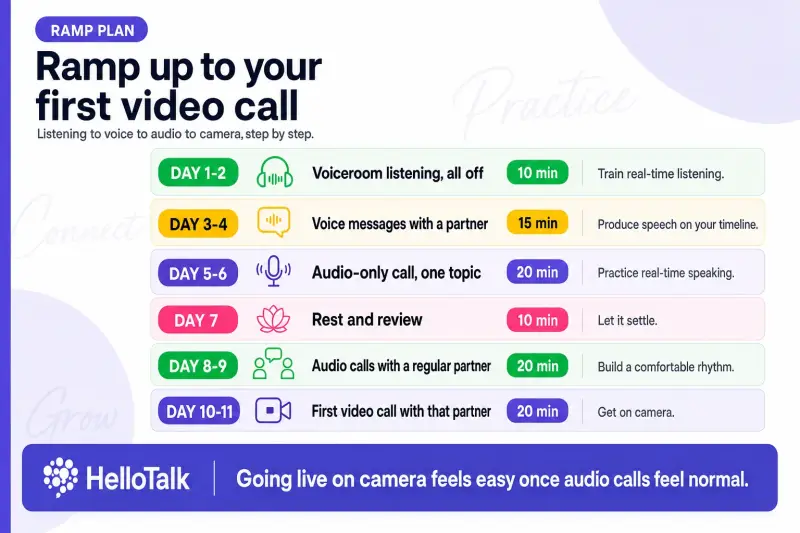
If video calls terrify you right now, this plan gets you comfortable in two weeks. Keep sessions short and consistent.
| Day | Activity | Time | Goal |
|---|---|---|---|
| Day 1-2 | Voiceroom listening, all off | 10 min | Train real-time listening |
| Day 3-4 | Voice messages with a partner | 15 min | Produce speech on your timeline |
| Day 5-6 | Audio-only call, one topic | 20 min | Practice real-time speaking |
| Day 7 | Rest and review | 10 min | Let it settle |
| Day 8-9 | Audio calls with a regular partner | 20 min | Build a comfortable rhythm |
| Day 10-11 | First video call with that partner | 20 min | Get on camera |
| Day 12-13 | More video calls, new topics | 20 min | Normalize the camera |
| Day 14 | Reflect on progress | 10 min | See how far you came |
By day fourteen, the thing that felt impossible two weeks ago, talking in English on camera with a native speaker, will feel almost routine. That is the whole shift, and it comes from climbing the ladder one rung at a time instead of jumping.
Common Mistakes That Slow You Down
A few habits keep people stuck at the text stage. Watch for these.
Jumping straight to video. Skipping the audio-only middle step makes the camera far scarier than it needs to be. Climb the ladder: listening, voice messages, audio calls, then video.
Practicing too rarely. One call a week is not enough to build real-time skill. Short, frequent sessions beat long, occasional ones. Consistency is what rewires your reflexes.
Over-preparing scripts. Writing out exactly what you will say defeats the purpose, because real conversation is unscripted. Prepare a topic and a few key words, then let the conversation go where it goes.
Only using paid tutors. Paid lessons are valuable, but the per-minute cost limits your volume. Mixing in free exchange calls with community partners lets you practice far more often. Our comparison of AI conversation versus real human practice also covers where solo AI tools help and where they fall short.
Frequently Asked Questions
What is the best free English speaking video call app? For free live practice with real native speakers, HelloTalk's free tier supports voice and video calls plus community Voicerooms. The paid tutor apps like Cambly and italki charge per session. See our roundup of free English speaking apps for 2026 for more.
Can I practice English on video without a tutor? Yes. Language exchange apps connect you with native speakers who are also learning your language, so you can do reciprocal video calls without paying for a tutor. The exchange is mutual, which also gives your partner a reason to keep practicing with you.
How is video practice different from voice or text? Video adds real-time processing, reading facial expressions and body language, and performing under the mild pressure of being seen. These are exactly the skills that real interviews, meetings, and in-person conversations demand, and they only develop through live video practice.
How do I stop freezing up on camera? Build up gradually. Start with Voiceroom listening, then voice messages, then audio-only calls, and only move to video once you are comfortable with a particular partner. Prepare a topic in advance, and accept that the first few calls feel awkward for everyone.
How often should I do video calls to improve? Frequency beats length. Two or three short calls a week is a solid start, and daily is even better if you can manage it. Building real-time skill is like building a physical muscle, so regular, repeated practice is what produces results.
Do I need advanced English to start video calls? No. Even at an intermediate level, video calls are hugely beneficial, and native partners on exchange apps expect learners to be imperfect. Starting before you feel ready is exactly how you build the skill, so do not wait for perfect grammar.
Get on Camera and Start Talking
The only way to get comfortable speaking English on video is to do it, live, with real people. You can ease in with audio and Voicerooms, then move to full video calls with native speakers, all at HelloTalk.