
The Spanish Fast-Start Stack: Tools to Use in Your First 30 Days

Most people who quit Spanish in month one do not quit because it is hard. They quit because they tried to "just start" with no plan, drifted between five apps, and had nothing to show for it. A stack fixes that. Instead of one magic tool, you use a small set of tools that each do one job, in a sequence.
Here is the core idea. The fastest Spanish stack is not the app with the most features, it is the smallest set of tools that keeps you doing both input and real output every single day. The Foreign Service Institute puts Spanish in its easiest category, roughly 600-750 class hours to professional proficiency, so your first 30 days is not about finishing anything. It is about building a rhythm you can keep for months.
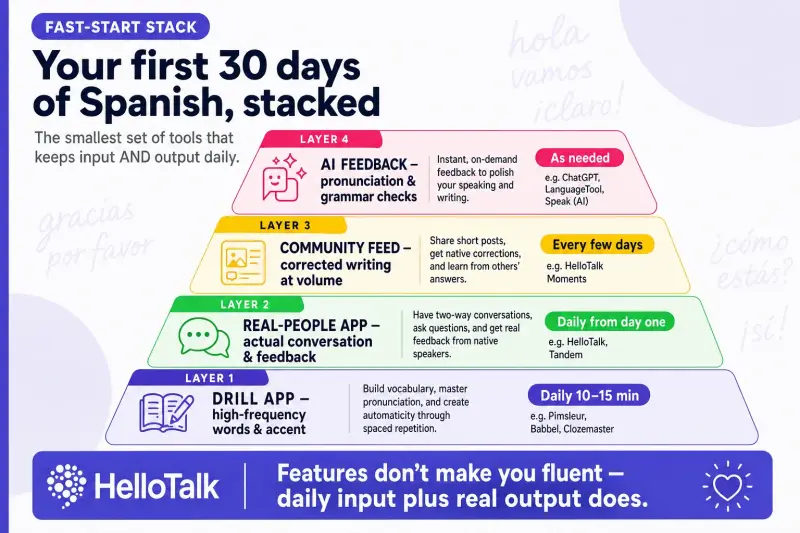
What's in the Spanish fast-start stack
| Tool type | Job it does | When it leads | Example |
|---|---|---|---|
| Drill app | High-frequency words, patterns, accent | Daily, 10-15 min | Pimsleur or Babbel |
| Real-people app | Actual conversation and feedback | Daily, from day one | HelloTalk |
| Community feed | Corrected writing at volume | Every few days | HelloTalk Moments |
| AI feedback | Pronunciation and grammar checks | As needed | HelloTalk AI tools |
Notice there is only one paid slot and it is optional. You can build a complete Spanish fast-start stack for free, because HelloTalk keeps 90% of core features free and covers conversation, community feedback and AI checks in one place.
Your first 30 days, week by week
Week 1: get a base and send message one
Do not spend the whole week studying. Spend 10-15 minutes a day on a drill app to pick up the most common words and a few sentence frames like me gusta, quiero, dónde está. Then, on day one or two, open a real-people app and send your first message in text.
Text is the on-ramp. With in-line translation and read-aloud, you can compose a Spanish message you could never yet say out loud, and check it before you hit send. For the mechanics of that first exchange, your first Spanish conversation and how to start speaking Spanish are the two guides to keep open.
Week 2: add feedback and enter a voice room
Now start posting to a public community feed. Write one short sentence about your day in Spanish and let several native speakers correct it. You will learn more from three real corrections than from a whole lesson.
This is also the week to enter a voice room as a listener. You do not have to speak. Just get your ear used to real, fast Spanish. HelloTalk's Voicerooms run 24 hours, so there is always one live.
Week 3: start talking out loud
Move from text to voice notes, then to short live calls. Use AI pronunciation scoring to catch the specific sounds you miss, then confirm with a native speaker who can hear the nuance a score cannot. Keep the drill app going in the background. A structured 30-minute daily Spanish routine fits perfectly here.
Week 4: hold a real conversation
By now you have a base, a feedback habit and some ear training. Have one genuine back-and-forth conversation with a native speaker, even if it is five minutes and full of mistakes. That is the milestone that proves the stack worked.
A realistic target for the end of month one is modest and worth stating plainly. You will not be fluent. You should be able to introduce yourself, ask and answer a few everyday questions, understand slow speech on familiar topics, and recover politely when you get lost with a phrase like ¿puedes repetir, por favor? That is a real, usable conversation, and it is more than most people who "studied Spanish for a year" can do, precisely because you spent your hours talking instead of only studying.
Why HelloTalk anchors the stack
The reason a real-people app sits at the center is simple: it is the only tool that turns study into actual conversation, and it does several jobs at once.
-
Chat-based learning with translation, transcription, read-aloud and real-time grammar correction, so you never leave the chat to look something up.
-
Moments, the community feed that gets your writing corrected by multiple native speakers.
-
Voicerooms and Livestreams, easing you from listening into speaking, plus small interactive live classes.
-
AI learning tools for pronunciation scoring and grammar correction with short explanations.
With 70M+ registered users across 200+ countries and 260+ languages, and over 1 billion messages sent daily, the practice partner you need in week one is already there. It is the hub of the whole exchange model, which our language exchange guide explains in full.
The reason one hub tool beats five scattered ones is friction. Every time you switch apps to translate a word, check a conjugation, or find a partner, you lose a little momentum, and momentum is the whole game in month one. When translation, correction, community feedback and live voice all live in the same place as the conversation itself, the gap between "I want to practice" and "I am practicing" shrinks to almost nothing. That is the real fast-start advantage: not more features, but fewer reasons to stop.
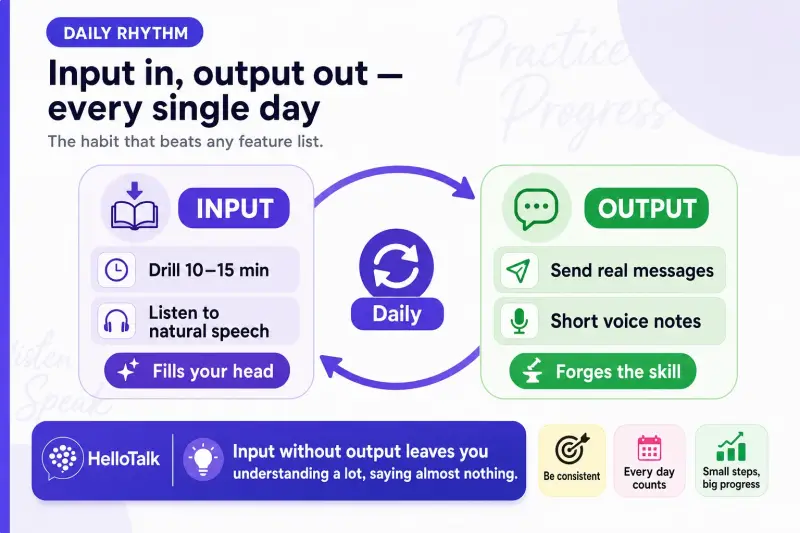
How this stack compares to going all-in on one tool
If you are weighing a single course against this multi-tool approach, Spanish courses vs language exchange makes the case for combining, and Pimsleur vs Babbel vs HelloTalk for Spanish helps you pick your drill app. For a speed-ranked overview of options, see the best apps to learn Spanish fast in 2026.
Common mistakes in the first 30 days
-
App-hopping. Five half-used apps beat nothing, but one drill app plus one real-people app beats all five.
-
All input, no output. If you never speak or write to a person, you are not building the skill you actually want.
-
Waiting for week four to talk. Send message one in week one. Postponing is how month one dies.
-
Skipping corrections. Practice without feedback just makes your mistakes permanent.
FAQ
What tools do I actually need to start Spanish fast? One drill app for words and accent, and one real-people app for conversation and feedback. That is the whole stack.
Can I do the first 30 days for free? Yes. HelloTalk keeps 90% of core features free and covers conversation, community feedback and AI checks, so the paid drill app is optional.
When should I first talk to a native speaker? Week one, in text. Live voice by week three. Waiting longer slows you down.
How much time per day? Around 30 minutes, split between a short drill and real practice, is enough to build momentum.
What if I am too nervous to speak? Start in text, then enter voice rooms as a listener. You speak only when you are ready.
Will 30 days make me fluent? No, and that is not the goal. The goal is a daily rhythm and a first real conversation, which sets up the months that follow.
Build your stack today
Your first 30 days start with a single message. Set up your stack, open HelloTalk, and send your first Spanish sentence today at HelloTalk.