
One Language App or a Learning Stack? The Best App Combinations by Goal

You open the lesson app to keep a streak alive, switch to a flashcard deck with sixty cards waiting, then open a pronunciation app that asks you to repeat the same five sentences. Forty minutes later you have touched three apps and still cannot answer a simple question from a real person without rewriting it twice in your head. That is usually not a discipline problem. It is a coverage problem: two or three tools are doing the same job while one job sits empty.
So the real question is not how many apps you should use. It is which jobs your goal needs covered, and whether one app already covers them.
Quick Answer: When Is One Language App Enough?
One language app is enough when your current goal depends on a single job done well, and a second app earns its place only when your goal depends on a job the first app cannot do at all.
One app is usually enough in these situations:
- You are in your first weeks and mainly need someone to decide what comes next.
- Your goal is recognition, not production: reading signs, following subtitles, understanding a podcast.
- You have fifteen minutes a day, and adding a second tool would eat the only consistent habit you have.
A second app becomes worth the split when you notice these signs:
- You score well inside the app and freeze the moment a person speaks to you.
- Your sentences are correct but people answer in ways you never practiced.
- You keep meeting words you "already learned" and cannot retrieve them without seeing the answer first.
- You can read a sentence aloud but cannot produce it without reading.
Each of those signs points to a specific missing job, not to a better brand. If you are still working out which individual tool handles which job well, the breakdown in language learning apps compared by task is the better place to start, and this article picks up where that one stops: how to combine them without duplication.
Build a Learning Stack Around Jobs, Not Brand Names
A stack is easier to design once you stop thinking in app names and start thinking in jobs. There are five jobs worth naming. They are not levels, stages, or a ranking, and you do not need to finish one before the next. They are five different kinds of work that a complete learning process requires, and any given app may cover one, two, or occasionally three of them.
The five jobs are new input and sequencing, explanation, rehearsal, review, and real response. Before you add anything to your routine, write in one sentence which of those five jobs the new tool will own. If that sentence matches a job your current app already covers, you are buying more study time rather than more coverage.
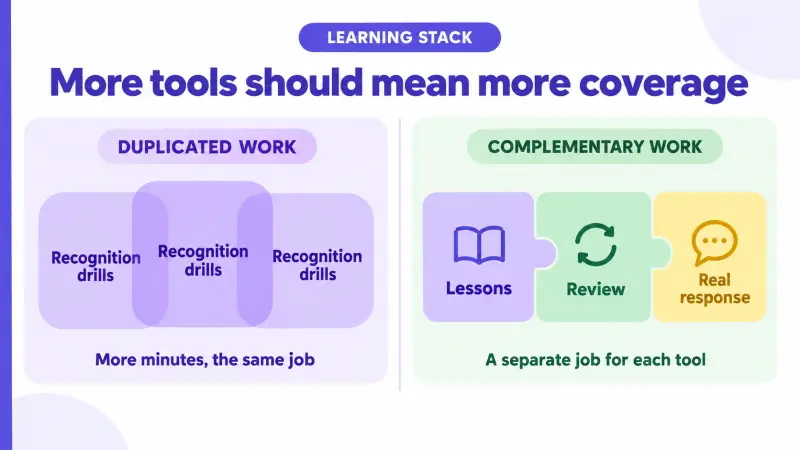
Two apps that both run recognition drills add study minutes without adding coverage; a stack only improves when each tool owns a job the others cannot do.
The table below is a diagnostic, not a shopping list. Read it by finding the row whose "sign this job is missing" column describes your week most accurately, then check whether anything in your current routine actually covers that row.
| Job | What it produces | Tools that usually own it | Sign this job is missing |
|---|---|---|---|
| New input and sequencing | A decided order of what to learn next | Guided lesson apps such as Duolingo or Busuu, textbooks, course series | You keep restarting beginner material and never pass the same point |
| Explanation | A reason a form works, not just a correct answer | Grammar-focused courses, coursebook notes, booked tutor sessions on italki or Cambly | You can fix a sentence when told, then repeat the same error next week |
| Rehearsal | Controlled output before a real exchange | Pronunciation and AI speaking tools such as ELSA or Speak, plus recording yourself | You can read a sentence but cannot say it without reading |
| Review | Weak items brought back before they decay | Spaced repetition tools such as Anki, or built-in review inside a lesson app | Words from last month only come back when you see the answer |
| Real response | An unscripted reply from a person, in context | Language exchange and conversation practice, including HelloTalk chat, Moments, and Voicerooms, plus tutors | Your grammar holds up but real replies go somewhere you did not prepare for |
Two honest limits belong next to that table. Booked tutor sessions cover explanation and response well but run on paid time rather than an always-on app, so they are hard to use daily. Language exchange gives you access to people rather than a fixed syllabus, so it does not decide what you study next. Jobs only sort themselves out once the goal is concrete, which is why it helps to set your learning strategy around a specific goal before choosing tools at all.
For Beginners: Pair Structure With Small Real-Use Tasks
At the start, the sequencing job matters more than everything else, and one guided app can legitimately be your entire stack for several weeks. The mistake is adding a second course when the first one stalls. Two syllabi compete for the same job, and neither gets finished.
For most beginners, the second tool should add a small real-use task rather than a second syllabus. The point is not to speak fluently in week two. It is to send something you built out of this week's material and see what a person does with it.
Task-first beginner material makes this pairing easier. The Japan Foundation's Irodori Starter course, Lesson 1, opens with usable greeting and self-introduction tasks rather than grammar tables, which means the material already hands you something sendable. Any course organized that way works the same: finish the lesson, then use it once outside the app.
Here is a suggested practice routine, not a guaranteed schedule. After a lesson on introductions, write two sentences using only the structures from that lesson, send them as a message to one language partner, and ask a single closed question they can answer briefly. On HelloTalk you can do that in the chat itself, where the built-in translation, transliteration, and read-aloud tools sit next to the message, so checking an unfamiliar reply does not mean leaving the conversation and losing the thread. Whatever comes back becomes your next study item: one phrasing you did not know, or one correction attached to a sentence you actually wrote.
Skip the flashcard app in the first weeks if your lesson app already schedules review that you complete. Adding spaced repetition makes more sense once you are carrying vocabulary the course no longer recycles for you.
For Speaking: Pair Rehearsal With Unscripted Responses
Speaking is not one job. It is two, and stacks built for speaking usually cover only the first one.
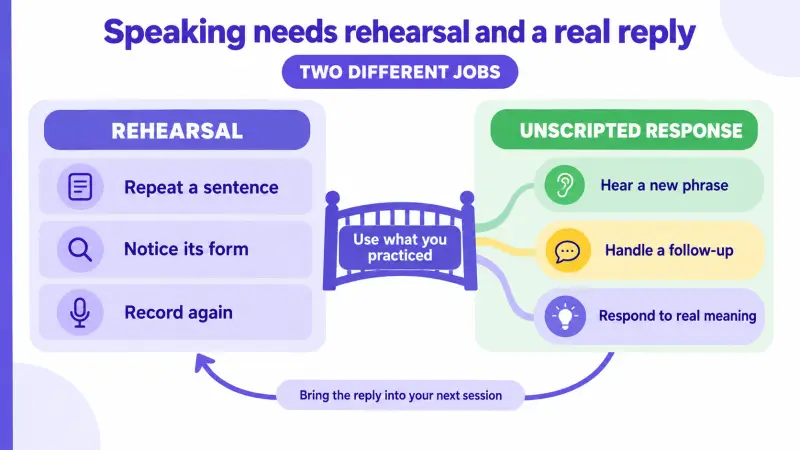
Rehearsal and unscripted response are different jobs: rehearsal makes a sentence repeatable, and only a real reply tests whether you can handle what comes back. Pronunciation tools and AI speaking practice are good at rehearsal because they let you repeat a sentence twenty times with no social cost and get feedback on the form. What they cannot supply is a person who asks a follow-up you did not plan, uses a phrase you have never met, or reacts to the actual content of what you said. The difference between those two kinds of practice is worth understanding in detail, and the comparison of AI conversation practice and real human language practice covers where each one holds up.
A practical two-app speaking stack pairs a rehearsal tool with a place where real people answer. A suggested sequence: record a three-sentence self-introduction in your rehearsal tool until it comes out without restarting, send it as a voice message to a partner, and end with one open question whose answer you cannot predict. Then write down the part of the reply that surprised you, and that becomes the next thing you rehearse.
HelloTalk supports both halves of that loop in the same place. HelloTalk's voice messages let you record, listen back, and re-record before sending, which keeps the rehearsal advantage while still sending to a person. For live practice, HelloTalk Voicerooms let you join as a listener before you ever speak, and HelloTalk's Voiceroom subtitles show spoken content as text, with Tap-to-Translate available on a word or sentence you select. Nobody can promise who replies or how quickly, so treat the human half as something you schedule across several attempts rather than one message you wait on.
For Vocabulary and Reading: Pair Review With Context
Spaced repetition is the most reliable single-job tool in language learning, and also the easiest to misuse. A deck can prove you remember a word in isolation while leaving you unable to place it in a sentence anyone would say.
A review app can confirm you remember a word, but only a context source can show whether that word fits the situation you want to use it in.
The pairing that fixes this is a review tool plus a steady context source: graded readers, subtitled video, news written for learners, or everyday writing by native speakers. The rule that keeps the pairing useful is where cards come from. Words harvested from something you actually read or heard arrive with a sentence and a situation attached. Words imported from a premade list of two thousand items arrive with neither, which is why they stay inert.
HelloTalk Moments works well as the context source in this pairing because the posts are ordinary daily writing rather than textbook sentences, which is where current phrasing, casual word choice, and regional variation show up. HelloTalk also allows corrections on Moments posts, so a short post of your own using this week's words is both output and a chance for someone to flag phrasing that reads oddly.
A suggested weekly loop: pick five expressions from what you read this week, add each card with the sentence you found it in, use two of them in a real message or short post, and keep the versions a partner echoed back naturally in their own reply. That last step is the part most review routines skip, and it is the only step that tests situation rather than memory.
Where HelloTalk Fits in a Two-App or Three-App Stack
By now the pattern across beginner, speaking, and vocabulary goals should be visible: the job most often left uncovered is real response. That is the slot HelloTalk occupies inside a broader learning process.
HelloTalk covers the real-use job in a stack: you send what you studied, a person replies in context, and that reply becomes the material for your next practice session. The full loop runs source material from your course or reading, an attempt you build yourself, a contextual reply from a real person, a review of what came back through chat corrections or Moments corrections, and one concrete task for the next session. Reducing that to "the app where someone fixes my grammar" wastes most of it, because the new information usually arrives in the reply itself rather than in the correction.
It also helps to name what HelloTalk does not do. HelloTalk does not hand you a numbered syllabus, so if your goal needs a fixed sequence, keep the course app in slot one. HelloTalk is not a spaced repetition engine either, so decaying vocabulary still needs a review tool. You can use HelloTalk without committing to a paid plan, though access details for any app can change over time.
The table below maps common goals onto two-app and three-app stacks. Use it after you have identified your missing job above, since the second column assumes you already know which job your current app covers.
| Goal | Two-app stack | What a third app adds | Skip the third app if |
|---|---|---|---|
| Absolute beginner, no deadline | Guided lesson app plus HelloTalk text messages | Spaced repetition once the course stops recycling old vocabulary | Your lesson app schedules review you actually complete |
| Speaking for travel or short exchanges | Pronunciation or AI speaking tool plus HelloTalk voice messages and Voicerooms | Booked tutor sessions for feedback on longer turns | You only need short transactional exchanges |
| Exam or academic reading | Course or textbook plus spaced repetition | HelloTalk Moments for everyday phrasing textbooks leave out | Your exam is reading and listening only, with no production |
| Living or working in the language | Course app plus HelloTalk chat, Moments, and Voicerooms | Spaced repetition for job-specific or daily-life terms | You already recycle those terms in real messages each week |
| Maintaining a language you once spoke | HelloTalk conversation plus a review tool for decayed vocabulary | Rarely needed | You already speak with people weekly |
If the empty slot in your stack is the response layer, you can open an account on HelloTalk and start with one short message built from the lesson you finished this week, then let the reply decide what you study next.
Frequently Asked Questions About Combining Language Apps
Is it better to use one language app consistently or several at once?
Consistency with one app beats an inconsistent rotation of four. The case for a second app is coverage, not variety: add it when your goal depends on a job your current app structurally cannot do, such as producing language for a real person or scheduling review of decayed vocabulary.
How many language apps is too many?
Practically, three is the working ceiling for most self-directed learners, because every added tool brings its own queue, notifications, and review debt. If you cannot say in one sentence which of the five jobs each app owns, you have at least one app too many.
How do I know if two apps are doing the same job?
Compare what each one produces at the end of a session. If both leave you with recognition of items you were shown, they cover the same job, even when the interfaces look different. Two tools are genuinely complementary when one decides what you learn and the other tests whether you can use it with a person.
Should beginners add a language exchange app right away?
You can, as long as the exchange stays small. In the first weeks, use it for one short message or one listening session built from material you already studied, rather than as a source of new grammar. That keeps the sequencing job with your course and gives the exchange a job of its own.
Can one app cover both structured lessons and real conversation practice?
Some apps cover parts of both, but no single tool reliably does the full sequencing job and the unscripted response job at the same standard. A course app decides your order and cannot produce a spontaneous human reaction; a conversation platform gives you real replies and will not assign your next grammar point. Most two-app stacks exist for exactly this reason.
Do I need paid plans to build a useful two-app stack?
Not necessarily. Many workable stacks run on free access to a lesson app, a free spaced repetition tool, and a free language exchange account. Paid plans usually buy more explanation, deeper review features, or time with a tutor, so decide which of those jobs is actually missing before paying for any of them.
What happens to my stack when I get busy?
Cut back to the single job that protects your goal rather than trying to keep every app alive at reduced volume. For a speaking goal, that is usually one short exchange with a person; for an exam, it is usually review. Dropping a tool for two weeks is recoverable, while abandoning the whole routine because it took forty minutes a day is much harder to restart.