
Japanese Flashcard Backlog: Decide What to Review, Change, or Reset
Published on
A backlog of hundreds of due cards in Anki or WaniKani is not one problem with one fix. Sort it first: which cards you can still produce correctly, which words you have actually forgotten, which cards were built badly, and which part of the backlog is really just new lessons piling up. That sorting happens inside the app itself and does not need another person.
Sending a recovered word to a willing partner on HelloTalk as a real sentence is one useful way to check how it lands in actual use. It is not a required step for clearing the queue, and it is not limited to words you are recovering for the first time.
What Your Backlog Number Actually Tells You (and What It Doesn't)
The due count on your home screen measures queue size, not memory. A large due count by itself only measures how many cards are waiting, not how much material you have actually forgotten. A hundred cards that piled up over a four-day trip can look identical to a hundred cards you have not touched in three months, even though the two groups may involve very different recall, and the elapsed time alone does not tell you which fixes are needed.
WaniKani's own guidance on recovering from a backlog describes three different causes behind a big number, and they can overlap rather than pointing to one single explanation: a break, going too fast, or genuine forgetting. The table below sorts out which situation likely describes you and what to check before deciding what to do next.
Three Patterns Behind a Backlog
| Pattern | What is actually happening | What the number alone cannot tell you | Question to test it |
|---|---|---|---|
| Too many reviews after a break | You stepped away and reviews queued up while you were gone | Whether you can still produce the answer, or only feel like you recognize it | Can you answer before the app reveals it, not just recognize the shape of it? |
| Too many reviews after going fast | New lessons were added faster than you consolidated them, so reviews stacked on reviews | Whether this is a forgetting problem or a volume problem | Were you adding new material before you had reviewed the old material enough? |
| Genuine, widespread forgetting | A real gap has opened between what the app expects and what you can currently recall | How much of the backlog is actually unrecoverable versus just rusty | Are you blanking on most of this, or only specific items? |
WaniKani's own reset guidance treats a break, a too-fast pace, and genuine memory loss as different situations that call for different responses, even though a single backlog can show signs of more than one. Reading your backlog against this split, rather than reacting to the number itself, is what decides the next three sections: whether you slow down new lessons, fix specific cards, or consider a reset at all.
Adjusting New Lessons While You Catch Up on Review
Once you know your backlog is mostly a pace problem rather than a forgetting problem, the next decision is what to do with new material while you catch up. Anki's deck options separate two settings that look similar but do very different jobs, and mixing them up is a common reason backlogs feel permanent.
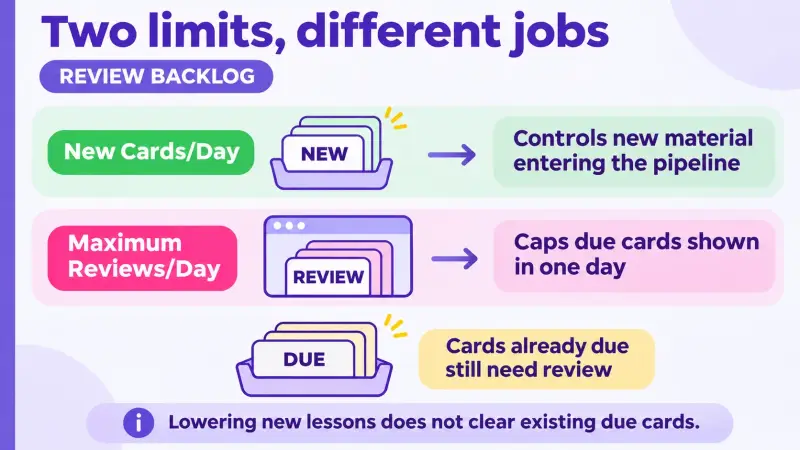
New Cards/Day controls how much new material enters your pipeline going forward. Maximum Reviews/Day is a per-day cap on how many due cards Anki displays in a single day; once you hit it, Anki stops showing more that day, but the cards that are still due do not disappear or get any easier to clear tomorrow.
Lowering your daily new-card limit reduces how much review load you add in the future, while raising or lowering the daily review cap only changes how many of today's due cards you see, not how many you actually owe. Anki's documentation is direct about the order here: when a backlog already exists, the recommended move is to stop adding new lessons until existing reviews are under control, not to hide the review count and call it handled.
WaniKani works on the same logic from the lessons side. If your backlog traces back to going too fast, the fix is pausing new lessons and working through existing reviews first, rather than opening fresh lessons on top of a pile you have not cleared. Pacing problems like this are also a big part of why study plans stall in the first place, covered in more depth in Why Fast Beginner Japanese Study Plans Fail at Week Three if the backlog is a symptom of a bigger schedule issue rather than a one-time break.
When a Card Needs Fixing Instead of Reviewing
Not every item sitting in your queue is actually a memory problem. Anki's documentation points to two concrete situations where resetting a single card, rather than reviewing it again, makes sense: the card's content was completely rewritten after you made it, or progress was logged on it by accident while you were only browsing instead of testing yourself.
A common version of this in Japanese decks is a card that pairs a full sentence with a vague prompt like just "meaning," so it is unclear whether you are being asked to recall the whole sentence's meaning or one specific target word inside it. A simple fix is rewriting the prompt to name the exact word being tested, such as changing "meaning" to "meaning of 予定 in this sentence."
Before assuming a card is simply due, check whether the prompt is ambiguous enough that more than one answer could be correct, whether the back of the card no longer matches what you meant to test, or whether the stored answer was mistyped or outdated so it no longer matches the correct reading or meaning for that word. If none of those apply and you still cannot produce the answer, that points to actual forgetting, not a bad card.
A card that needs rewriting is a different problem from a card that is simply due, and treating every repeated miss as a design flaw skips the simpler explanation that you have not reviewed it enough yet. If a specific card fails because of an ambiguous prompt or a mismatched answer, rewrite that one card; it is not evidence that the whole deck needs a reset.
What Anki's Reset and WaniKani's Level Reset Actually Change, and When Each Might Fit
Once you have ruled out pacing issues and fixed any clearly broken cards, the remaining question is whether anything left actually calls for a reset. Anki and WaniKani define resetting differently, and the table below compares what each one actually changes, since treating them as interchangeable is where a lot of backlog advice goes wrong.
Anki's own documentation does not recommend resetting a deck just because its review queue is backlogged. The cases it does describe as reasonable, such as a card whose content was completely rewritten or progress logged by mistake while browsing, are examples it gives, not an exclusive list. Resetting a card, or several cards at once, returns them to new status and restarts their own scheduling; your prior review history for those cards stays visible for reference, though it does not drive how the reset cards are now scheduled.
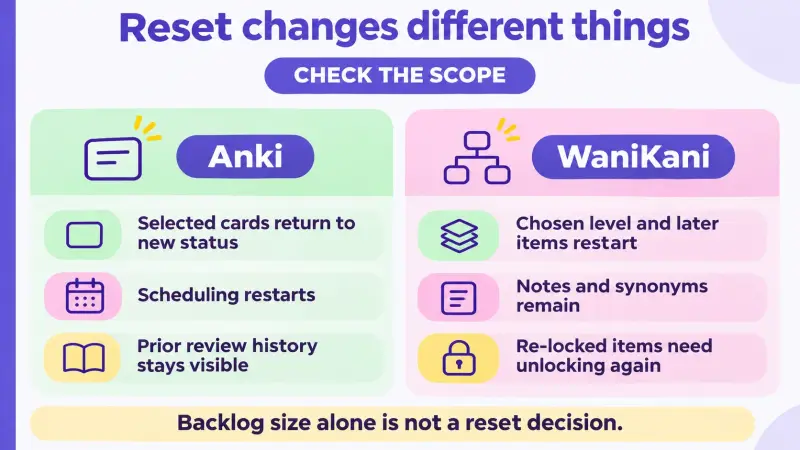
WaniKani's level reset works at a different scale: instead of touching one card, it rewinds your account to a chosen level, and the items at that level plus everything learned afterward re-enter the learning queue rather than keeping their previous stage. Your user-added synonyms and notes are not deleted, but you cannot access those items again until they are unlocked again.
| Anki | WaniKani | |
|---|---|---|
| Reset just for backlog size | Not recommended by Anki's own documentation | Not recommended; pacing adjustments and catching up on reviews come first |
| When a reset fits | Card content was completely rewritten, or progress was logged by mistake while browsing, per Anki's examples | You have checked and confirmed you cannot recall a large share of a specific level's items |
| What a reset changes | The selected card returns to new status and restarts its own scheduling | The chosen level and everything learned after it re-enter the learning queue |
| What stays intact | Prior review history for that card remains visible for reference | Account and prior notes remain, though re-locked items are inaccessible until they are unlocked again |
The table is a quick way to see what each system's reset actually touches; the decision itself still starts with checking your own recall, since neither platform recommends resetting from the backlog number alone. If you are still deciding between Anki and WaniKani for ongoing study rather than just this one backlog, Japanese Learning Tools Compared looks at how the two fit into a broader toolkit beyond how each one handles a backlog.
Bringing a Recovered Word Back into Real Use
Recovering a word, whether through a normal review or a review after a reset, still leaves it inside flashcard software rather than in anything you have actually said to someone. Checking how it works in a real sentence is a separate step, and a willing partner's response is useful here, not because it clears your backlog, but because it shows whether your usage matches how the word is actually used outside the app.
A practical version of this is picking one word you just reviewed that is relevant to something actually happening in your week, then sending it on HelloTalk as a real message with a real question attached, not a request to grade your memory.
For example, if you just recovered 予定 (plans, schedule), you might send: "来週、友達と映画を見る予定があります。週末、何か予定はありますか。(I have plans to see a movie with a friend next week. Do you have any plans for the weekend?)" This is a hypothetical example, not a transcript.
A reply tells you about the other person's own plans, and whatever comes with it, a correction, a comment, or simply an answer, gives you a sense of how the word sits in an actual exchange that a review screen cannot provide.
If you also want a quick check on whether the phrasing itself sounds natural, you can ask that as a short, separate follow-up, not as the main point of the message. Keep the ask narrow: one word, one sentence, one specific question, not a request to check an entire paragraph. If a reply points you toward a more natural phrasing, that version is worth saving and reusing next time the same word comes up in your deck, so the exchange actually feeds back into your study.
How new lessons and review sessions fit into a broader weekly routine, including where moments like this belong, is covered in The Perfect Japanese Learning Stack for Beginners.
FAQ
Does a large backlog number mean I have forgotten everything in it?
Not necessarily. A due count measures how many cards are waiting, not how much you actually remember, so the same number can reflect a short break, a too-fast pace, or genuine forgetting depending on the cause.
Should I pause new lessons or focus on reviews first when I have a backlog?
If your backlog came from adding lessons faster than you reviewed them, pause new lessons and work through existing reviews first. Adding more material on top of an uncleared backlog tends to make the pile grow rather than shrink.
Does lowering my daily review limit actually reduce my backlog?
No. The review limit is a per-day cap on how many due cards you see; it does not reduce the total number you owe, so the backlog is still there the next day unless you actually work through reviews. Lowering new lessons only limits how much new material gets added on top; it does not clear cards that are already due.
Is it ever okay to reset progress in Anki?
Anki's own guidance does not recommend resetting just because a queue is backlogged, but it describes cases such as a card whose content was completely rewritten, or progress logged by mistake while browsing, as reasonable examples.
When does WaniKani's level reset make more sense than catching up normally?
A level reset fits when you have checked and confirmed you genuinely cannot recall most of a level's items, not simply because the review count looks large. Catching up and reviewing normally is the default first step, and a reset affects that level plus everything learned afterward.
How do I tell if a card is badly designed instead of just overdue?
Check whether the prompt is ambiguous, the back no longer matches what you meant to test, or the stored answer was mistyped or outdated so it no longer matches the correct reading or meaning. If none of those apply and you still cannot produce the answer, that points to forgetting rather than a bad card.
Do I need a conversation partner to clear a flashcard backlog?
No. Sorting and working through the backlog happens inside Anki or WaniKani. A willing partner becomes useful afterward, when you want to check whether a recovered word works the way you think it does in an actual sentence.
What is a reasonable first question to ask myself when I see a big backlog?
Ask whether you can actually produce the answers or only recognize them, whether you were adding new lessons faster than you reviewed, and whether you are blanking on most of the material or only specific items. The answer points toward pacing, card fixes, or a reset worth considering.
If you want to check how a recovered word actually works once you have sorted out your backlog, HelloTalk is a reasonable place to send that one sentence and ask.