
Choose a Spanish Listening Video by What You Can Follow
Published on

If you can follow the main action of a Spanish video without pausing every few seconds, keep it; if you cannot, the usual fix is an easier or more familiar clip rather than more willpower. The hard part is that a clip labelled Superbeginner can still feel heavy when the topic is unfamiliar. A human reply helps later, when you want to ask about the same topic and read or hear an answer nobody wrote for your level. A short text or voice message on HelloTalk is where that step happens.
Judge the Video in Front of You, Not Your Level Label
A level label is a filter for a catalogue, not a verdict on you. Dreaming Spanish separates Superbeginner material from later levels, and its own guidance also says difficulty varies inside a level, suggesting easier material or familiar topics and presenters when something feels too hard. A level label narrows which videos to try, while the opening of a specific clip only gives you a first read on whether to keep watching it today.
That changes the question you ask at the start of a session. Instead of deciding what level you are, you decide whether this video is followable right now. The answer can be different tomorrow, with a different topic, or even partway through the same clip when the subject shifts.
It also means watched hours are not a grade. Input time does not convert into a guaranteed stage, so treat time spent as a habit record and leave the difficulty decision to the clip itself. If you are still assembling a starting set of materials, the overview of Spanish apps and resources by learning need covers what each type of tool is for.
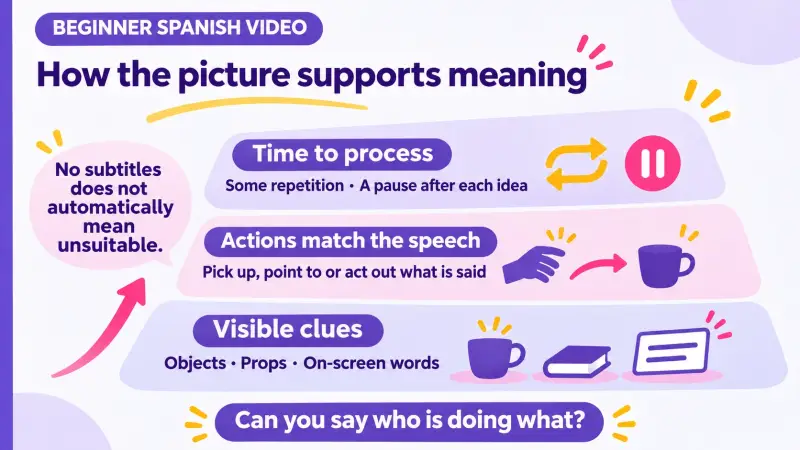
The first thing worth inspecting in any beginner clip is what the picture is doing while people talk. That support is visible in the opening seconds, before you have committed to the whole video.
What Visual Support Looks Like in a Superbeginner Clip
There is a public example you can open and check. The official Dreaming Spanish YouTube channel hosts a video titled Easy Spanish Story: The Coffee Shop - Superbeginner Spanish, and the first seconds show an acted cafe scene with an on-screen "Hola. Hola." while the characters greet each other.
That pairing is what visual support usually means at this level: a short line of speech arriving at the same moment as something you can see happening. In the Dreaming app, a Coffee Shop sample is listed with Superbeginner, Colombia and Shelcin in its metadata, along with topic filters such as conversations, scenes, drinks and restaurants.
Access differs by route. The in-app player for that sample asks for a free account, so plan on registering if you want to watch inside the app, while the story is also posted as a public cut on the channel. The two are not necessarily the same edit, and what any channel keeps public can change, so judge the version you actually press play on.
When you look at the opening, these are the supports worth noticing:
- objects held or pointed at while they are named
- an action performed just before or while it is described
- drawings, props or written words on screen
- a line repeated with a small change
- a speaker who pauses after each idea
A clip without subtitles or a transcript is not automatically wrong for you. It simply gives you less to lean on, which tends to matter more on an unfamiliar topic than on a scene you could narrate in your own language.
Same Level Label, Different Difficulty: Topic and Speaker Matter
Topic familiarity is one of several things that move difficulty inside a single label, alongside speed, vocabulary and how much the picture shows. Ordering a coffee uses nouns sitting on the counter, while a story about a childhood memory or a comparison between two ideas often asks you to hold meaning that the scene does not show, even though some clips still draw or act out what they describe.
Two videos carrying the same Superbeginner label can differ noticeably in difficulty, and Dreaming Spanish's own guidance treats that as normal rather than as proof you picked the wrong level.
The speaker matters in a quieter way. After a few videos with the same presenter, their pace, favourite phrases and gestures become more predictable, which is why Dreaming Spanish's guidance points learners back toward presenters they already know when a session feels hard. Regional variety, like the Colombia tag on that coffee shop listing, is a feature of the library rather than a difficulty ranking; if your real question is which variety to prioritise, Spanish resources for your destination handles that choice separately.
Both factors are easier to use as a quick look at the start of a video than as a theory about your level.
Check the First Minute, Then Keep It, Change the Topic, or Go Easier
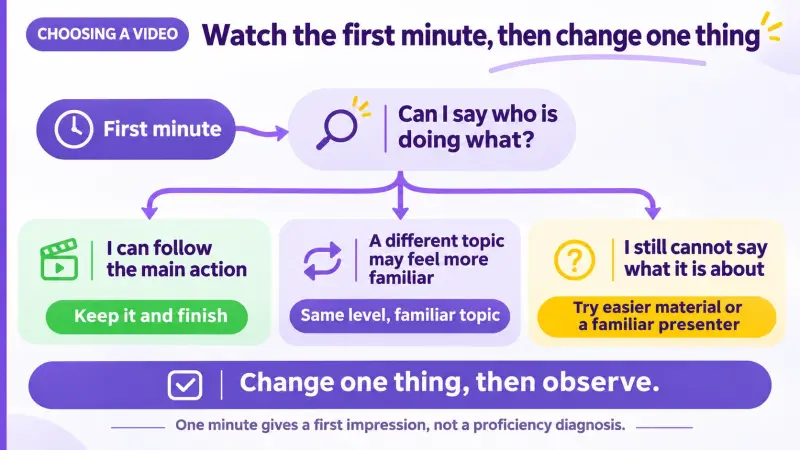
Most of the decision happens in the opening minute, before you have invested much time. The table below pairs something you might notice with possible reasons and one move you can try next. The middle column holds possibilities rather than diagnoses, since the same confusing minute can come from the topic, the vocabulary, the speed or the lack of anything to look at.
| What you notice in the first minute | Possible reasons | Something to try next |
|---|---|---|
| You can say who is doing what, even with words missing | The visuals, the topic or both are carrying enough for now | Keep the clip and finish it |
| You follow only while a subtitle line is on screen | Reading may be doing more of the work, though speed or vocabulary can also be involved | Keep it, then rewatch one part with your eyes off the text |
| The clip moves to something not shown on screen and you lose the thread | Less to look at, plus any mix of topic, vocabulary and pace | Try a clip at the same level on a topic you could describe in your own language |
| After a minute you cannot say what it is about | Several things arriving at once, which is hard to separate while watching | Switch to easier material or a presenter you already know |
| You catch nearly every line and your attention drifts | Familiar ground, or simply how your attention is running today | Keep it as review if it still helps, or pick another clip in the same series |
Changing the topic and dropping to easier material are different adjustments, so it is more practical to make one change and watch what happens than to settle on a single cause after a minute. What usually goes wrong is the bigger jump: leaving a zero-beginner scene for fast connected speech and concluding that listening is hopeless.
The subtitle row deserves one note. Reading along and hearing are separate jobs, and the reasons a word you know in text slips past you in audio are set out in the piece on words you recognise in subtitles but miss in audio.
Selective reuse beats constant hunting. Keeping two or three clips you can follow and returning to them across a week gives you something to compare new material against, and easy material keeps some value as review even after it feels comfortable. Moving on when your interest drops is a preference, not a promotion, and working with one short Spanish story shows one way to build that kind of repeat use.
If You Want to Say Something About the Topic, Move to a Reply on HelloTalk
A chosen clip is prepared input; another person's answer is not. If you want that second kind of input, send one short question about the same topic on HelloTalk, by text or voice. HelloTalk's chat includes text and voice messages, translation and correction tools, so you can ask in simple Spanish and work through what comes back at your own pace.
Keep the question answerable in a sentence or two. After the coffee shop clip, two messages you could send are:
- ¿Qué pides normalmente en una cafetería? (What do you usually order at a coffee shop?)
- En tu ciudad, ¿la gente toma el café de pie o sentada? (In your city, do people drink coffee standing up or sitting down?)
A possible answer might be as short as "Un café con leche" (a coffee with milk) or a few lines about a place near their home. Either way, those words were not chosen for your level. A written reply gives you something to read and reread; if you also want something to listen to, you can ask for a short voice message, and whether one arrives is up to the other person. People reply when they feel like it and say what they want to say, so treat any answer as a bonus rather than an assignment you set.
This step is a communication choice, not part of the resource's method. Dreaming Spanish recommends delaying speaking for many learners, so if you would rather not speak yet, you can ask in writing or simply keep watching for now. Asking in text is still producing Spanish, just not out loud.
When an answer contains wording you want, copy it into your own notes with the situation it came from, then listen for it in the next clip you watch. A partner understanding your message is not confirmation that your pronunciation or grammar were correct, because context carries a lot of the meaning. If accuracy matters on one sentence, you can ask them to write it the way they would say it, which gives you limited feedback on wording rather than a full check.
FAQ: Choosing Spanish Listening Videos
Should I choose by level label or by what I can follow?
Use the label to narrow the list, then decide with the clip in front of you. Dreaming Spanish's own guidance acknowledges that videos inside one level differ, so the label alone will not tell you whether today's choice works.
Is every Superbeginner video equally easy?
No. Difficulty inside a level shifts with the topic, how much the picture shows, the pace and how familiar the speaker is. An acted cafe scene with visible props is often easier to follow than a clip describing something that never appears on screen.
Do I need an account to try a Dreaming Spanish clip?
The in-app player for the Coffee Shop sample asks for a free account, so plan on registering if you want to watch inside the app. The same Superbeginner coffee shop story is posted publicly on the official Dreaming Spanish YouTube channel, although what any channel keeps public can change over time.
What if I only understand while subtitles are showing?
Keep the clip, but treat reading and hearing as two separate jobs and rewatch a short part without looking at the text. The reasons that gap appears are covered in the article on words recognised in subtitles but missed in audio.
Does a reply in chat count as listening practice?
A text reply gives you reading practice first. If you want listening, you can ask for a short voice message, since HelloTalk supports both text and voice in chat, and leave it to the other person to choose which one to send.
Should I start speaking while I am mostly listening?
That is your call rather than a rule. Dreaming Spanish recommends delaying speaking for many learners, while a short question on HelloTalk is a separate step you can take, and you can keep it in text if you would rather not speak yet.
How do I know my Spanish question was understood as intended?
The content of the reply is your main evidence: if it answers what you actually asked, that is a reasonable sign it landed. If the answer is vague or goes somewhere else, a short follow-up usually clears it up. Asking the person to rewrite your sentence the way they would say it gives you limited feedback on wording, not a direct confirmation of your meaning.
How long should I stay with one clip before changing?
There is no fixed number. Returning to two or three followable clips across a week is a reasonable habit, and switching makes more sense when you can already state what the clip is about and your attention is drifting.
If you have a clip you can follow and a question you would like someone to answer about its topic, send one short message in Spanish on HelloTalk and see what comes back.