
Typing Your First Korean Messages: From Hangul Keys to a Message of Your Own
Published on

If you can recognize a few Hangul letters but still end up pasting translated text instead of typing your own, the task is learning to enter letters in order on a Korean keyboard so they combine into syllable blocks, then catching typos and spacing before you send.
A real reader becomes useful once you have typed something yourself. On HelloTalk, you can send that short original message to a willing Korean-speaking partner and ask one specific question about it, getting a response about how your own sentence actually reads instead of only a translation tool's output.
Writing One Short Korean Message of Your Own, Not a Copied Translation
Copying a translation into the chat box sends something, but it skips the keyboard-entry practice this task is actually about: producing your own words by entering letters in order. If you worked through the alphabet using a resource such as the one described in the resource gap many beginners hit right after learning Hangul, typing your own first message is a reasonable next step once letter recognition feels solid.
If the obstacle turns out to be finding the right keys or getting them to combine into a block, practicing that specific task is more useful than reviewing more vocabulary. This task stays narrow on purpose: write one short sentence, type it correctly, and have it checked by someone who can read it, which means separating problems beginners tend to lump together as "I can't type Korean."
Typing a Korean message depends on three separate skills: finding the right keys, assembling them into a syllable block, and checking the result before you send it. Treating these as one problem can make a small keyboard issue feel like a much bigger language problem than it is.
Setting up a Korean keyboard layout without changing your device language
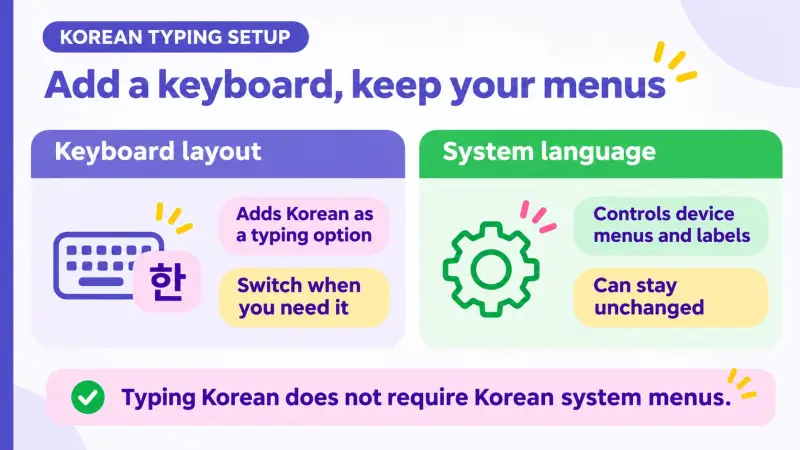
Before typing anything, your phone needs a Korean keyboard layout added as an option, not a new system language.
Adding and switching a Korean keyboard with Gboard
Google's published Gboard instructions describe this as opening keyboard settings, choosing Languages, selecting Add keyboard, picking Korean and an available layout, then Done; switching to that keyboard while typing is a separate action from adding it. Menu labels and exact options can vary by device and Android version, so treat this as published guidance to check against your own phone rather than a guaranteed click path.
If you are putting this together without a tutor, a resource built for self-directed learners helps at this stage too, something covered in choosing a Korean learning website when you do not have a tutor; a good resource can describe what a syllable block should look like, but it will not add the keyboard for you.
Adding a Korean keyboard layout and changing your phone's system language are two different settings, so it helps to know which one you are changing before you start typing.
The table below compares what each setting actually changes.
| Action | What it changes | What it does not change |
|---|---|---|
| Add a Korean keyboard layout | Gives you a Korean option you can switch to while typing | Your phone's menus, settings, or system language |
| Switch to that keyboard while typing | Lets you type a message in Korean, then switch back | Anything already typed in another language |
| Change the device system language | Changes menus and labels into Korean | Not required just to type Korean messages |
Both adding the layout once and switching to it when you want to type Korean are useful day to day; you do not need to touch your system language for either one.
How Hangul letters combine into syllable blocks you can actually type
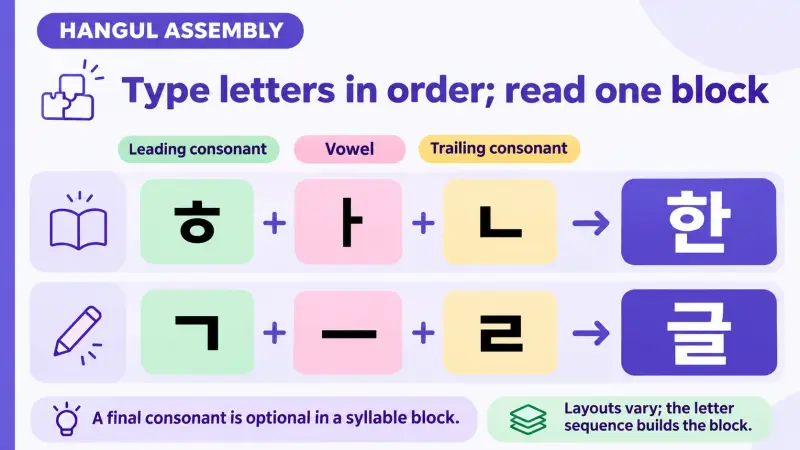
Hangul letters are entered one after another on a keyboard, the same way you would type English letters in sequence. What is different is how they are displayed: instead of appearing as a flat row, the letters you type combine automatically into a single block for each syllable.
A Hangul syllable block is built from a leading consonant, a vowel, and an optional trailing consonant, entered in that order and displayed together as one character rather than as separate letters in a row. Most desktop keyboard layouts, including the documented two-set arrangement shown below, assign each of these jamo, the individual consonant and vowel symbols, to its own key; mobile layouts can group several choices on a single key, so typing them in the right sequence is what produces the block either way.
Two conceptual examples show the pattern. Entering ㅎ, then ㅏ, then ㄴ in sequence produces 한; entering ㄱ, then ㅡ, then ㄹ in sequence produces 글. In both cases the first letter is the leading consonant, the second is the vowel, and the third is the trailing consonant that closes the block.
One published two-set keyboard map, for instance, places ㅎ, ㅏ, and ㄴ on the G, K, and S keys, and ㄱ, ㅡ, and ㄹ on R, M, and F; this is one documented layout, not a claim about every keyboard or device. Layouts vary, so treat any single map as an example of how letters can be arranged rather than a universal key chart.
Fixing typos, spacing, and syllable breaks before you hit send
Once a block appears on screen, the next step is checking it against what you meant to type, rather than assuming the first attempt is correct. Changing one letter inside a block changes the whole syllable: swapping the final consonant from ㄴ to ㄹ turns 한 into 할, a different syllable that can change the word or form you intended in context.
Checking a typed Korean message block by block catches a wrong key or a missing space that a quick scan of the whole line can miss. A fast reread alone does not reliably confirm correct spacing; comparing the message against a sentence you already know is correct does more.
Spacing is a separate check from the blocks themselves. Korean places spaces between words and phrases, not between every syllable: in 저는 학생이에요 (I am a student), a space separates 저는 from 학생이에요, while 학생이에요, itself made of several syllable blocks, stays written as one connected word with no space inside it.
If a block looks wrong, the simplest fix is retyping that short word from scratch using a model you already trust, rather than trying to edit a few letters inside an uncertain block.
Sending your first self-written message and checking it with a real partner on HelloTalk
A practical way to start is adapting a short sentence you already know rather than inventing one from nothing. Take a model such as 안녕하세요. 오늘 날씨가 좋아요. (Hello. The weather is nice today.), type it letter by letter, and compare the result against the model for missing letters or spaces.
Once that sentence types correctly, change one part to something true for you right now, such as swapping 날씨가 좋아요 for a different real observation, so the message reflects your own situation rather than copying the example. Adapting a known pattern this way still produces your own typed sentence, even though the structure came from somewhere else.
A real partner's response can tell you whether your own sentence reads the way you intended, which is different information than confirming you copied a model correctly. On HelloTalk, send that short message to a willing Korean-speaking partner along with one specific question, such as 이 문장이 자연스러워요? (Does this sentence sound natural?). A clear, narrow question like this is answerable in one reply; asking someone to review your whole typing setup is not.
Interpretation and spelling are two different things a partner can help with, so it is worth being clear about which one you are asking for. If they point out a better word or a small fix, save that version and reuse it in a different real message later. Once typing a short message feels manageable, moving from text to voice follows a similar pattern, covered in Korean speaking practice methods that get you talking with native speakers.
FAQ
Do I need to change my phone's system language to type Korean? No. Adding a Korean keyboard layout is a separate setting from changing your device's display language, so your menus can stay as they are while Korean becomes an available keyboard option.
What is a syllable block, and why does it look different from typing English letters? A syllable block groups a leading consonant, a vowel, and an optional trailing consonant into one character; you still enter the letters in sequence, but the keyboard displays them combined rather than as a flat row.
Is there one correct keyboard layout for Korean? Layouts vary by keyboard and device, so a published map for one layout, such as a two-set arrangement, shows one way the letters can be arranged rather than the only setup; check the layout your own keyboard app actually uses.
How do I know if my spacing is correct? In Korean, a written group like 학생이에요 is actually several syllable blocks plus an ending, written together with no space inside; a space appears only between separate words, as in 저는 학생이에요, where it falls between 저는 and 학생이에요. Comparing your message to a sentence you already trust is correct is a useful check.
What should I ask a language partner about my first typed message? A narrow, answerable question works well, such as whether a specific word sounds natural or whether a sentence means what you intended, rather than asking for a full review of your typing setup.
Can I keep sending translated text instead of typing my own messages? You can, and a translation tool still has its uses, but pasting translated text skips the keyboard-entry practice this task is about, and it cannot tell you whether your own typed sentence reads naturally to another person the way a partner's response can.
Will a keyboard app automatically fix my spacing or typos? Keyboard suggestions and autocorrect behavior vary by app and device and are worth checking on your own phone rather than assuming; comparing your message against a sentence you already trust is a more reliable habit while you are learning.
What if my Korean-speaking partner does not reply right away? Responses are not guaranteed or instant, so keep practicing with your next message in the meantime rather than waiting on one reply before continuing.
Typing your own first Korean message is a specific, learnable task, and trying it is a clear way to see how it reads. Set up your keyboard, type one short sentence, and send it to a partner on HelloTalk to see what they understood.