
Spanish Verb Practice Tools: Choose Drills, Reference, or a Real Reply
Published on

If you only need to see how hablar looks in the preterite, a conjugation table answers that by itself. A real reply matters at a different moment: someone asks you something, and the question and the situation point somewhere, but no setting names the form you should use. HelloTalk covers that step, because you write or record the sentence in chat and the other person responds to what you actually said. The familiar difficulty is finishing a clean preterite quiz and then stalling on ¿Qué hiciste ayer? (what did you do yesterday).
Ella Verbs, SpanishDictionary.com, or a Real Reply: Name the Job First
Four different jobs hide behind the phrase "Spanish verb practice", and they do not need the same tool. Looking up a form is a reference job. Repeating forms you have already met is a drilling job. Picking between two plausible forms inside your own sentence, when nothing has named the target for you, is a decision job.
Matching the tool to the job keeps you from blaming an app for something it was never doing:
- Check one form or one ending: conjugation pages on SpanishDictionary.com.
- Repeat forms with settings you control: the Conjugation Drill on SpanishDictionary.com, or quizzes in Ella Verbs.
- Practise inside sentences and read an explanation when you miss: Ella Verbs lessons and Custom Quiz.
- Say something only you can answer: a message to a partner on HelloTalk, because they reply to your content and you pick the form that fits what you mean.
A reference table tells you which forms exist; a real exchange asks you to pick one around your own meaning, with no setting naming the target. Both are real practice, and neither replaces the other.
If you are still assembling a starting set of materials rather than picking a verb tool, a wider Spanish resource comparison covers apps, courses and free resources at that stage.
Ella Verbs: Lessons, Smart Quizzes, and Custom Sentence Drills
Ella Verbs is built around conjugation as its main subject rather than as one grammar chapter. Its official feature description covers guided conjugation lessons, quizzes, and explanations when an answer is wrong, so a miss comes back with a reason attached instead of a red mark.
Two features shape how personal the practice gets. My Verbs keeps a list of verbs you care about, and Smart Quizzes are described as drawing on your own history rather than a fixed set. That matters if the verbs you keep needing are not the textbook's first twenty.
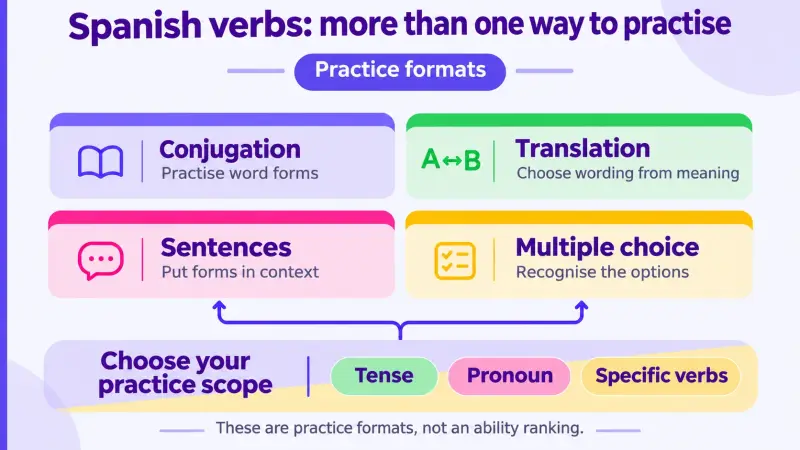
Ella Verbs covers more than isolated endings: its Custom Quiz settings include conjugation, translation, sentence and multiple-choice formats, alongside selecting tenses, pronouns and specific verbs. Calling it a fill-in-the-blank app would be inaccurate, since a sentence mode is part of the documented design.
Regional coverage is stated on the same page: European Spanish, including vosotros, and Latin American Spanish. A specific vos setting is not spelled out there, so check that yourself if voseo is what your conversations use.
Access is split simply on its public description. Basic present-tense material is free, while the Pro level covers the wider range of tenses and the Smart Quizzes. Which settings your own account includes is worth confirming in the app before you plan a month of practice around them, along with how the screens feel day to day.
SpanishDictionary.com: Conjugation Tables, Drill Settings, and What Changes on Phones
SpanishDictionary.com plays two roles that are easy to confuse. One is reference: a conjugation page you open mid-sentence to settle a doubt. The other is practice. The Conjugation Drill lets you select verb types, tenses and pronouns, and it can pull verbs from premade lists or from your own vocabulary list.
The conjugation pages themselves carry more than a grid of forms. Official support documentation describes translated examples and pronunciation controls on those pages, which is why many learners open them to confirm meaning rather than only spelling.
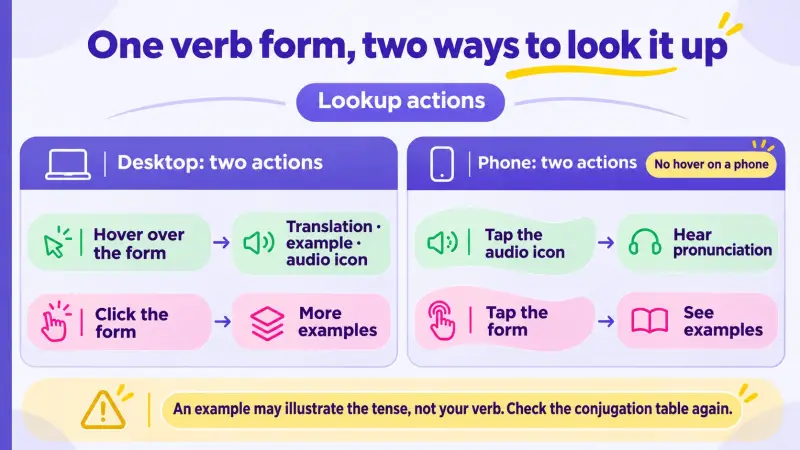
On desktop, hovering over a specific form shows its translation, an example sentence with a translation, and a speaker icon you can click. Clicking the form itself opens more example sentences for that form. On a phone there is no hover: you tap an audio icon to hear the pronunciation and tap the form to open example sentences.
One detail worth knowing before you trust an example: an example attached to a tense can illustrate that tense generally rather than the exact verb you looked up. Read it as a model of the tense, then confirm your verb in the table above it.
Access also shapes your settings. Regional vos and vosotros options for the drills are listed among the Premium benefits, so not every pronoun configuration belongs to the free tier. If the people you talk to use vos, check that before planning your drill schedule around it.
Tense, Pronoun, and Regional Options Side by Side
The two apps overlap on paper and differ in what you can control, so the comparison below is organised by the control you are looking for rather than by brand. The third column is not a third app of the same kind; it is what happens when a form goes into a message and a person answers it. Read each row as "who decides this", and expect the honest blanks.
| What you want to control | Ella Verbs | SpanishDictionary.com | A reply in HelloTalk chat |
|---|---|---|---|
| Tense selection | Custom Quiz settings include choosing tenses | Conjugation Drill settings include tenses and verb types | You choose the tense yourself, guided by the question and the situation |
| Pronoun selection | Custom Quiz settings include choosing pronouns | Drill settings include pronouns | Set by who you are writing to and what you decide to say |
| Regional vos and vosotros | Its feature page states European Spanish including vosotros, plus Latin American Spanish; a specific vos setting is not spelled out, so check it if you need voseo | Listed among Premium benefits for the drills | Whatever your partner actually uses when they write back |
| Sentence-level work | Custom Quiz includes sentence and translation formats | Conjugation pages include translated examples | The full-sentence task described here is sentence level, though chat messages can also be single words or phrases |
| Examples and audio | Lessons and explanations are described; audio behavior is worth checking in the app | Conjugation pages include examples and pronunciation controls, with desktop and mobile differences | HelloTalk's chat description includes text and voice messages plus media sharing |
| Where an answer comes from | Quiz answers with explanations for wrong ones | Reference tables and drill answers | A person's own response, which addresses meaning in that exchange rather than grading a form |
| What stays uncertain | In-app flow, scoring detail and exactly which settings your account includes | Interface details differ by device | Whether and when someone replies |
Nothing in that table ranks the three. It shows that two of them hand you the settings and the answer key, while the third hands you a question you did not write.
Take One Form Into a Real HelloTalk Reply
Start from one form you have just drilled, then build a message where that form is the obvious choice and the other person has something to answer. After preterite practice, a message like Ayer fui al mercado y compré fruta para toda la semana. ¿Tú compras fruta en el mercado o en el supermercado? works well: "Yesterday I went to the market and bought fruit for the whole week. Do you buy fruit at the market or at the supermarket?"
You send it in HelloTalk chat because the other person replies to your question with their own content, and the tense was your decision rather than a drill setting. Note that your own clause stays in the preterite while the question moves to the present, since it asks about a habit rather than about yesterday.
Keep the feedback request narrow. Instead of "correct my Spanish", attach one doubt: En esta frase, ¿"compré" suena natural, o dirías otra cosa? ("In this sentence, does compré sound natural, or would you say something else?") One sentence and one question give a volunteer something specific to respond to, and HelloTalk's chat includes translation and correction tools if they want to mark the wording directly.
Voice messages give you a second kind of check. You can say the same sentence aloud in HelloTalk chat and ask whether one word came through, which is useful because compré (I bought) and compre are different forms rather than one word with an optional accent, and in speech the stress is what separates them. Someone guessing your meaning correctly is not proof that your pronunciation or grammar was right, and if a reply comes it may arrive hours later or not at all.
When wording comes back that you want again, save it yourself. Before you file it, check that the suggested sentence still says what you meant, not only that it matches the tense you were drilling. Copy it into personal notes with the tense you were working on, reuse it next time, and open the conjugation table again to see how the form they used compares with the one you had practised.
This is the gap that practising grammar without a pattern hint deals with in more detail: exercises stay easy partly because the target is announced. If you are weighing structured study against exchange time more broadly, combining Spanish courses and language exchange looks at how the two divide the work.
FAQ: Spanish Verb Practice Tools
If I can only use one tool, which one?
Pick by the job you keep failing at. If you cannot recall forms at all, a drill app with tense and pronoun settings helps most. If you can recite forms but freeze when someone asks you a question, practice that already names the target tense tells you little about choosing on your own, although sentence and translation modes can still help.
Is Ella Verbs just isolated fill-in-the-blank practice?
No. Its official feature description includes sentence and translation formats inside Custom Quiz, plus multiple choice, along with lessons and explanations for wrong answers.
Can I drill vos or vosotros on SpanishDictionary.com?
Regional vos and vosotros options for the drills are listed among the Premium benefits, so check your access level before building a study plan around those pronouns.
Do conjugation pages work the same on my phone as on a laptop?
Not identically. On desktop, hovering over a form shows a translation, an example and a clickable speaker icon, and clicking the form opens more example sentences. On mobile there is no hover: an audio icon plays the pronunciation and tapping the form opens examples.
If my partner understood my sentence, was the verb correct?
Not necessarily. Context carries a lot, and a willing reader can follow a sentence with the wrong tense. Treat a successful exchange as communication, and confirm the form in a conjugation table.
How do I ask for feedback without asking too much?
Send one sentence and name one doubt, such as the tense choice in a single clause. People on HelloTalk are learners sharing time rather than teachers on call, so a question with visible boundaries is easier to answer than a block of text.
When one of your drilled forms is ready for a real answer, open HelloTalk, send the single sentence you want to use, and attach one question about it.