
Russian Learning Apps for Beginners: Match Each App to a Practice Job

If you cannot read Cyrillic yet, pick an app that teaches the alphabet as its own unit; if you can read it but freeze the moment nothing is scripted, the missing step is a person who answers you, and HelloTalk chat is one place to ask for that. The stall is concrete: you finish a Russian lesson, recognise every word on the screen, and still cannot write one true sentence about your own Saturday that anyone would reply to.
Quick Comparison: Four Russian Apps and the Beginner Tasks They Cover
Each app below is checked against the same four questions: which beginner job it covers in Russian, what you actually do inside it, where any feedback comes from, and what the published material says about Russian specifically. This follows each company's own course and help pages rather than hands-on trials, so use the table to sort options, not to crown one.
| App (Russian course) | Beginner job it covers | What you actually do | Where feedback comes from | Russian access note |
|---|---|---|---|---|
| Busuu | Read Cyrillic first, then move through levels | A separate alphabet course for the 33 letters, then lessons from A1 to B2, travel content and vocabulary revision | Exercise checking inside lessons, plus support from Russian speakers in the community when someone chooses to respond | Busuu lists Russian from A1 to B2; the AI Conversations supported-language list does not include Russian |
| Babbel | Work through structured lessons and drill set phrases aloud | Reading, writing, listening and speaking activities, alphabet and pronunciation work, speech-recognition practice and Review | Speech-recognition practice attached to course items, plus the Review feature | Babbel's Guided Conversations are guided listen-and-record dialogues listed for German, French, Italian and European Spanish at A1 and A2 on mobile, not Russian |
| Pimsleur | Answer out loud from audio while your hands are busy | 30-minute core audio lessons, Cyrillic reading lessons, flash cards, Voice Coach and Speak Easy role-play in the Russian premium description | The model answer that follows each prompt, which you compare your own answer with; Voice Coach is listed separately as a speech-recognition feature | That feature list describes a specific Russian edition; confirm what your own access includes |
| HelloTalk | Say something true in Russian and get a person's answer | Send a short Russian text or voice message in HelloTalk chat, ask one question the other person can answer, and ask in plain words for one narrow correction | Another user who chooses to reply, plus corrections a partner writes by long pressing your written message | HelloTalk chat text and voice messaging are documented; no reply and no correction is owed to you |
The rows overlap on purpose. A beginner Russian week usually needs letters, audio and at least one unscripted message, and those three rarely come from the same place. The sections below take each app in that order and mark where its documentation stops.
Busuu: Start With Cyrillic and a Structured Russian Course
Zero is a real starting point in Russian, and it is not the same as zero in Spanish, because you cannot even guess at a word until the letters settle. Busuu lists Russian from A1 to B2 and provides a separate alphabet course covering the 33 letters, which means Cyrillic is treated as its own unit rather than as a side note inside the first lesson. Busuu's Russian page also lists travel content and vocabulary revision.
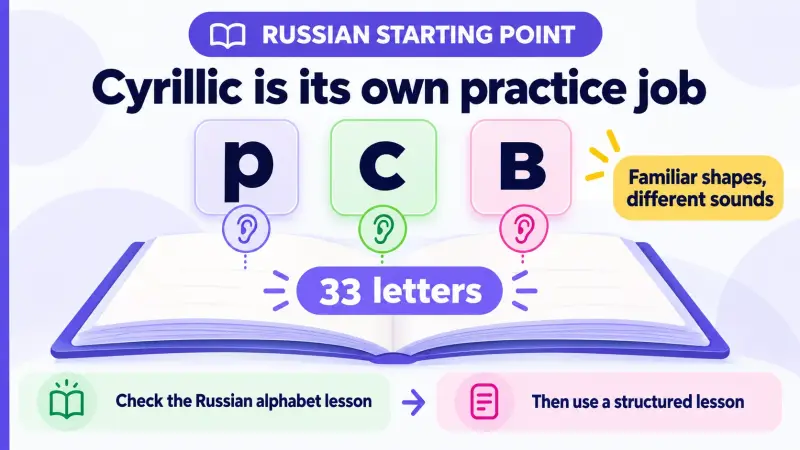
The community side matters here, but keep the expectation accurate: Busuu's Russian course page describes support from Russian speakers, which comes from other users who choose to respond, not from a scheduled tutor sitting in the app. Nothing in that description promises that a particular submission gets looked at, or how quickly.
Busuu's AI Conversations supported-language list covers English, Spanish, French, German and Italian, and Russian is not on that list, so a Russian learner cannot plan a week around that particular conversation feature inside Busuu. Automated feedback can also respond to a sentence you invented, so what a person adds here is narrower: whether this particular reader understood you, and their own answer. HelloTalk chat is one such route, not the only place people reply. Once the alphabet course stops being hard, write one sentence of your own, send it to a Russian speaker there, and ask plainly whether it is clear.
Babbel: Work Through Russian Lessons and Pronunciation Practice
Babbel's Russian page describes courses that cover the alphabet and pronunciation alongside reading, writing, listening and speaking activities, with speech-recognition practice and a Review feature. For someone who wants a lesson to open, be finished, and be reviewed later, that shape is the point, and it is a different job from open conversation.
Babbel's Guided Conversations help article lists German, French, Italian and European Spanish at A1 and A2 on mobile only, so Russian learners should plan around the Russian course's own speech-recognition practice rather than that guided dialogue feature. Features advertised for one language on a platform do not carry over to another, and Russian is the language where that assumption gets expensive.
What speech recognition covers differs from product to product, and Babbel's Russian page presents it as practice inside the course. The thing it does not establish is what a particular listener heard. If that is your question, record the phrase as a voice message in HelloTalk chat and ask one listening question, such as which word was hard to catch, because only the person listening can answer that.
If you also want the wording rewritten, type the sentence into the same chat. HelloTalk's correction tools work on a written message, so a partner needs the text in front of them rather than only an audio clip.
Pimsleur: Build Audio Responses With Reading Support
The job Pimsleur does is narrow: a prompt comes through the audio, you answer out loud, and the model answer follows so you can hear what you were aiming at. Pimsleur's Russian premium description includes 30-minute core audio lessons, Cyrillic reading lessons, flash cards, Voice Coach and Speak Easy role-play, and that feature set is attached to that product edition rather than to every way of reaching the Russian course. Voice Coach sits in that list as a separate speech-recognition feature, so the core lessons are best read as giving you something to compare against, not a verdict on each reply you speak.
Audio drilling also carries Russian stress by ear, which written Russian will not give you, since ordinary Russian text does not print stress marks and the stressed syllable can move when a word changes form. Hearing the pattern repeatedly is a reasonable way in, as long as you do not assume any particular screen in any app will show the mark for you.
What a rehearsed prompt cannot give you is this particular person's answer. So take one line you can now say without the audio playing, make it the first sentence of a HelloTalk message, and add one question the other person can answer from their own week. Unlike a live call, a chat reply sits there: you can replay a voice note or reread a message, work out what it says, and answer later.
HelloTalk: Use a Short Russian Message Someone Can Actually Answer
Courses supply the material; this step is where you find out whether it survives contact with a person who did not write your lesson. HelloTalk supports Russian among the 260+ languages listed on the HelloTalk homepage. HelloTalk's official help pages document two things that carry this task: sending a text or voice message in chat, and corrections that another user writes by long pressing a message, which also means a reply is a choice the other person makes, not a feature you can switch on.
Here is a constructed first message, written as a teaching example rather than copied from a real exchange: "Здравствуйте! Меня зовут Алекс. Я учу русский три недели. Что вы обычно делаете в субботу утром?" In English: "Hello! My name is Alex. I have been learning Russian for three weeks. What do you usually do on Saturday morning?" Use вы with someone you have not met, and switch to ты only if they suggest it.
Two things make that message answerable. It contains one true fact about you, and it ends with a question the other person can answer from their own life without guessing what you want. Note also that past-tense verbs agree with the speaker: "Я начал учить русский" if you are male, "Я начала учить русский" if you are female.
If typing Cyrillic is still slow, the microphone in HelloTalk chat records and sends a voice message instead, which also lets a listener hear your stress rather than read around it. Keep it to about two sentences, for example "Я сейчас читаю простые тексты. Это трудно, но интересно." ("Right now I am reading simple texts. It is difficult but interesting.") Treat any length suggestion as an adjustable budget rather than a measured target.
Then ask for one narrow thing, and remember the request itself is just an ordinary written question. In HelloTalk, name the sentence you want looked at and add one question, such as whether "три недели" sounds natural there, because a specific ask is easy for a partner to act on when they have a minute.
The rewrite comes from the other side. A partner long presses your written message and uses HelloTalk's correction tools to send back an edited version, which is why a sentence you want corrected should be typed rather than only spoken. For a voice message, ask a listening question instead. A language exchange partner is trading practice with you rather than working as your teacher, so any request can be declined or simply left unanswered.
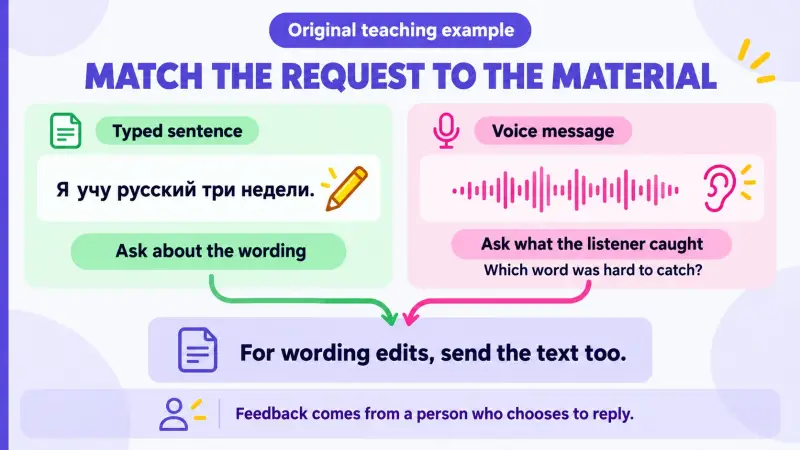
Saving the rewritten version and building your next message around it is one way to keep a correction in use rather than in a folder. As a constructed illustration rather than a real exchange, a Russian speaker might say that "Я учу русский уже три недели" sounds more natural to them; the original sentence was not wrong, and уже is a nuance about how the duration lands. Reusing it means writing something like "Я живу здесь уже два года" in a later HelloTalk message and asking that partner whether it reads naturally there, since what you want to know is whether the pattern transferred.
Two alternatives sit next to one-to-one chat. HelloTalk's Moments feed takes a short Russian sentence as a public post, where other users can correct it with the same long press, which suits a sentence you are unsure about but do not want to build a conversation around, and responses there are equally voluntary. HelloTalk also hosts live audio rooms you can join as a listener, though which rooms are open in Russian at a given hour varies. If you want the wider routine around partner choice and weekly exchanges, the Russian language exchange guide covers that ground.
Check Russian-Specific Features and Access Before Committing
A feature can exist on a platform and still not exist in Russian, which is worth checking before you give any of these a month. The left column below is what to look for, the middle columns are what the published material actually shows, and the right column is the part only you can settle by opening the app.
| Russian-specific check | Why it matters in Russian | What the published material shows | What to confirm yourself |
|---|---|---|---|
| Cyrillic teaching | 33 letters, several of which look like Latin letters and sound different, such as р, с and в | Busuu lists a separate alphabet course; Babbel's Russian page covers alphabet and pronunciation; Pimsleur's Russian premium description includes Cyrillic reading lessons | Whether typing and handwriting are practised, or only recognition |
| Stress marks on screen | Stress is unmarked in ordinary Russian text and can move when a word changes form | Audio courses let you hear stress, but the published pages used for this comparison do not state where stress marks are printed in the Russian lessons | Open one Russian lesson and look for marked vowels before relying on it |
| Case endings explained | Six cases change nouns, adjectives and pronouns, so a memorised phrase will not transfer unchanged into a new sentence | Busuu lists structured lessons from A1 to B2; Babbel's Russian course includes grammar-based lesson activities | Whether explanations appear in a language you read easily and can be reopened later |
| Review of earlier items | Endings and stress shift with word form, so a word you met once comes back in a different shape | Busuu lists vocabulary revision; Babbel lists Review; Pimsleur's Russian premium description includes flash cards and review | Whether review items are drawn from your own errors or from a fixed list |
| Conversation features in Russian | These features are often announced for a few languages first, and the names mean different things | Busuu's AI Conversations supported-language list covers English, Spanish, French, German and Italian; Babbel's Guided Conversations are guided listen-and-record dialogues listed for German, French, Italian and European Spanish | The current in-app language list, rather than a feature page written for another language |
| Open output with a person | A rehearsed answer stays inside the material; a real reply comes out of someone's own situation | HelloTalk documents sending text and voice messages in chat, and corrections another user writes by long pressing a message | Whether you can send two sentences without copying them out of a lesson |
Access is the last filter, and it moves. What is included without payment differs by product and by edition, and those terms change, so read the current conditions inside each app rather than from any article, including this one. One more practical note: if you turn a Russian voice message into text, HelloTalk's own troubleshooting material warns that voice-to-text can be inaccurate when audio quality is poor or the wrong language is selected, so set Russian and treat the transcript as a rough aid rather than a pronunciation verdict.
For the wider picture beyond apps, including courses, websites and reading material for the first few months, see the guide to free online resources for beginner Russian learners. When the course part of your week is running and you want the unscripted part, one short Russian message to a real person is the next move, and HelloTalk is where this article puts that step.
Frequently Asked Questions
Which Russian app should an absolute beginner open first?
If Cyrillic is still unfamiliar, start where the alphabet is taught as its own unit: Busuu lists a separate alphabet course for the 33 letters, and Babbel's Russian page covers alphabet and pronunciation. If you can already sound out words but have never spoken, an audio-led course such as Pimsleur gets your voice moving sooner. Neither sequence is the only correct one.
Can I learn Russian with only one app?
A single course app can take you a long way through grammar and vocabulary. Its lesson material is prepared in advance, so it is not one particular person's reply to a sentence you wrote yourself. Some apps also carry a community: Busuu's Russian course page describes support from Russian speakers, which comes from other users and only arrives when someone chooses to respond. A second app is not required. If you want another channel where a person answers you, HelloTalk chat is one option, and it covers a different job rather than repeating the course.
Does Busuu's AI conversation practice work in Russian?
Busuu's help article on AI Conversations lists English, Spanish, French, German and Italian as the supported courses, and Russian is not among them. Busuu's Russian course still offers structured lessons from A1 to B2, vocabulary revision and support from Russian speakers in the community. Language lists change, so check the current one in the app before planning around it.
Is speech recognition enough for Russian pronunciation?
What speech recognition covers varies by product, and Babbel's Russian page lists it as practice inside the course, which is genuinely useful for drilling set phrases. The question it does not settle is what a particular listener understood. For that, send the phrase as a HelloTalk voice message and ask one person a single listening question, such as which word was unclear; if you also want the wording rewritten, type the sentence into the same chat so a partner has text to correct.
How long should my first Russian message to a language partner be?
Short enough that you wrote all of it yourself. Two or three sentences with one true fact and one answerable question is a workable starting size, and that is an adjustable suggestion rather than a measured ideal. A long introduction pasted out of a translator can come back as a reply you cannot read yet, which stalls the exchange before it starts.
What should I ask a HelloTalk partner to correct?
Ask for one thing at a time, in plain words: name the sentence you want looked at and add one question, such as whether a phrase sounds natural there. The correction happens on the other side, where a partner long presses your written message and uses HelloTalk's correction tools to send back an edited version, so type the sentence you want corrected rather than only recording it. A full grammar explanation is a lot to ask of someone who is also practising, and any request can be declined.
Do I need to pay to practise Russian speaking?
What is included without payment differs by product and edition and changes over time, so the current terms inside each app are the only reliable source. HelloTalk documents text and voice messaging in chat as the way to reach another person, and corrections there are written by other users rather than sold as a service. No plan at any level can guarantee that a particular person replies to you.