
Which Premium Language App Features Matter for Speaking, Listening, and Review?

You finish a lesson, hit the paywall in the next exercise, and the upgrade screen lists a dozen things: unlimited lessons, offline downloads, a personalized path, an AI tutor, pronunciation analysis, a review dashboard. None of it tells you which item fixes the problem you actually have, which is that you froze for six seconds in a real conversation last Tuesday and then switched to English.
So the honest way to read an upgrade screen is skill by skill. A premium feature is worth paying for when it changes what you produce or what you notice, not when it only unlocks more of the same content. Speaking, listening, and review break for different reasons, and each one has a small set of features that genuinely moves it plus a larger set that just makes the app more pleasant to open.
Quick Comparison: Match Premium Features to the Skill You Need
Before comparing tools, name the symptom. "I want to improve my Spanish" gives you no way to evaluate a feature list, while "I can read the sentence but cannot say it while someone is waiting" points directly at a category of feature. The table below pairs each skill with the failure you would notice, the feature type that changes practice quality, the limit of that feature, and tools that are built around that particular job. Read it as a diagnosis grid, not a ranking: nothing here is better overall, it is better at one task.
| Skill you want to move | What you notice going wrong | Feature type that changes practice quality | What that feature will not fix | Tools built around this job |
|---|---|---|---|---|
| Speaking | You know the words but cannot assemble them in real time | Speech feedback that names the exact sound or structure, plus prompts that force unscripted output | Whether your sentence suits the situation or sounds natural to a listener | ELSA Speak, Speak, the speaking exercises inside Duolingo and Busuu |
| Listening | You follow course audio and lose ordinary conversation | Adjustable speed, segment repeat, and transcripts you can hide, applied to native-speed speech | Words you have never met in written or spoken form | LingQ, Pimsleur, podcast-style listening tools |
| Review | You recognize last month's vocabulary but cannot retrieve it | Scheduled return of weak items stored with your own sentence and the reason it failed | Mistakes you never captured because they happened live | Anki, Memrise, in-app review trainers |
| Real response | You produce sentences and never learn whether they worked | Human reply, correction in context, and a follow-up question you did not script | Gaps in basic structure that still need study time | HelloTalk, italki, Cambly |
One note before the detail sections: tier contents and free allowances change often across all of these tools, so check what the current free version already covers before deciding that a paid plan is the only way to get the feature you want.
Speaking Features: Create Output and Explain What Went Wrong
A speaking feature does one of two jobs, and most upgrade screens blur them together. The first job is creating output pressure, which means putting you in a position where you have to say something now. The second job is diagnosis, which means telling you what specifically failed.
Output pressure is easy to build and easy to fake. A scripted roleplay with an AI partner gives you unlimited attempts with no social cost, which is genuinely useful when you are still nervous, but the responses stay inside a predictable range. Timed prompts and shadowing exercises also create pressure, and free tiers often include enough of them to test whether you will use the feature at all.
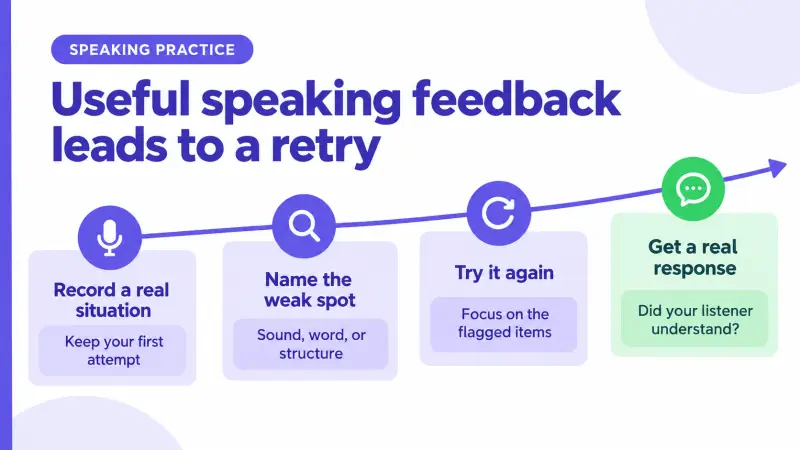
Diagnosis is where paid speaking features either earn their place or do not. A speaking feature helps when it names the specific sound, word, or structure that failed, not when it only marks an attempt correct or incorrect. ELSA Speak is built around phoneme-level feedback in English, which means it points at the individual sound rather than the whole sentence. A generic "try again" prompt tells you nothing you can practice tomorrow.
Here is a suggested practice cycle, not a tested program. Pick one four-sentence situation you genuinely need, such as explaining what you do for work. Record it cold and keep the recording. Run it through whatever pronunciation feature your app offers, write down only the two items it flags most often, and re-record those two sentences the next day. On the third day, send the same situation as a voice message to a real person and watch whether the reply shows they understood, because that is information no score gives you. If you are still deciding between bundles rather than tools, the walkthrough on how to compare premium feature sets before you subscribe covers the ordering question in more depth.
Listening Features: Control Difficulty Without Removing Real Speech
Listening features fail in the opposite direction from speaking features. Instead of giving too little help, they often give so much that the listening stops happening. Permanent transcripts, always-on translation, and slowed audio all feel productive, and all of them can quietly turn a listening session into a reading session.
Listening support is only useful if you can remove it in stages; a feature that permanently replaces audio with text trains reading instead. That is why the settings matter more than the content library. Speed control, five-second replay, transcript toggles, and per-word lookup that you can trigger after a listen rather than during it are the controls that let you keep the same clip and raise its difficulty.
The following ladder is a suggested way to use those controls on whatever material your app provides. Each rung removes one form of support, and the last column is the signal that you are ready to move up.
| Rung | Support you keep | Support you drop | Move up when |
|---|---|---|---|
| 1 | Slowed audio, full transcript, word lookup | Nothing | You can follow the slow version without reading ahead |
| 2 | Native speed, transcript after the first listen | Slowed playback | You can summarize the clip after two plays |
| 3 | Native speed, transcript only for the parts you missed | Reading along in full | You can point to the exact second you lost the thread |
| 4 | Native speed, replay allowed, no transcript | Lookup during the first listen | You can answer a question about the clip from memory |
The other thing to check is what kind of speech you are training on. Course audio is recorded cleanly, at a steady pace, with no overlapping voices, which makes it a poor preview of a group conversation. Unscripted speech includes restarts, fillers, and people talking over each other. The HelloTalk platform runs Voicerooms that you can enter as a listener before you say anything, and HelloTalk displays Voiceroom subtitles as text while Tap-to-Translate handles a word or sentence you select, so you can sit in real multi-speaker audio with a safety net that you control rather than one that runs constantly.
Review Features: Bring Weak Items Back at the Right Time
Review is the skill people pay for last and need most, because the failure is invisible. Nothing feels wrong while you are studying. The gap shows up weeks later when a word you definitely learned refuses to come out.
Scheduling is the part worth paying for. A review system that returns items based on how well you handled them last time, rather than in a fixed list order, keeps weak items circulating and lets solid items fade into longer intervals. Anki and Memrise are built around that scheduling logic, and many course apps include a lighter version of it inside their own review tab.
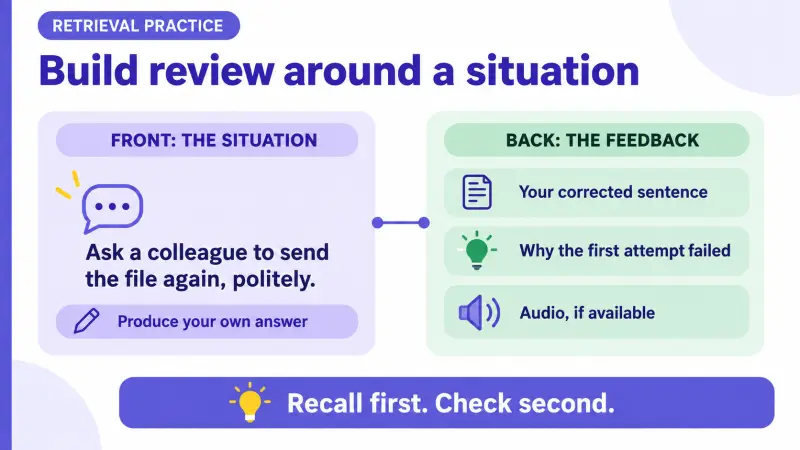
A review system earns its place when it stores your own failed sentences along with the reason they failed, not only words you tapped once in a lesson. A saved word with no context gives you a recognition test. A saved sentence that you actually got wrong, plus a one-line note explaining why, gives you something to retry. Two features make a real difference here: the ability to create your own cards from anything, including a correction you received in a conversation, and prompts that ask you to produce the item rather than pick it from four options.
As a suggested card format, put the situation on the front in your own language, such as "asking a colleague to send the file again, politely." Put your corrected sentence on the back, one line on what was wrong with your first attempt, and audio if the tool supports it. Retrieval from a situation prompt is much closer to what conversation demands than retrieval from a translation prompt. For a wider look at which paid capabilities tend to justify a subscription across different app types, the breakdown of language app features worth paying for covers the same question from the product side.
Personalization and Access Features: Useful Support, Not the Learning Goal
Offline downloads, multi-device sync, placement tests, custom daily goals, streak protection, ad removal, and completion certificates all show up high on upgrade screens because they are easy to describe. They are not empty, but they belong in a different category: they protect how often you practice rather than what happens while you practice.
That distinction becomes practical when you look at your own week. If your only reliable study window is a commute with no signal, offline downloads are the feature that changes your month, and no amount of pronunciation analysis will help if the sessions never happen. If you already study daily, paying for goal customization will not move anything. Placement tests sit in between: they save time by skipping content you know, and they also skip gaps you did not realize you had, so treat the result as a starting point rather than a verdict. The guide to premium features that help you practice more often goes deeper into the consistency side of this question.
A simple habit helps here. Set a date one month after you subscribe, and on that date, list the paid features you actually opened. Anything you never used was not solving a problem you had.
Add HelloTalk When the Practice Needs a Real Response
There is one gap that no feature list closes on its own. You can pronounce a sentence accurately, schedule it perfectly, and still not know whether a person would say it that way, whether it sounded too blunt, or what they would ask you next. A real response is the only part of the practice loop that tells you whether your sentence worked on another person, and no automated score can supply that.
This is where HelloTalk sits inside a full learning process rather than beside it. Take a phrase from the lesson or listening clip you just worked through, write it or record it in your own words, and send it to a language partner. HelloTalk supports text, voice, and video communication, with in-chat translation, transliteration, and read-aloud available so an exchange does not stall the moment one word blocks you. When the reply comes back, you get two things a course cannot give you: an answer shaped by what you actually said, and often a rewrite. HelloTalk's correction workflow applies to chat messages and to Moments posts, so a sentence you published to the community can come back marked up by people who use the language daily, and Moments also lets you read how native speakers write about ordinary days.
Then close the loop. Save the correction with the reason, put it into the review format from the section above, and give yourself one follow-up task: use the same structure in a different situation later that week, or take it into a Voiceroom where you start as a listener and speak when you are ready. If your routine already has lessons, drills, and a review deck but nobody responding to what you produce, HelloTalk is the layer that is missing, and a fair amount of it is available before you consider any paid plan. One practical note: no app can promise when a particular person replies, so send messages small enough that a short answer still moves you forward.
Frequently Asked Questions About Premium Language App Features
If I can only pay for one feature, which should it be?
Choose by symptom. If you go silent under time pressure, pay for speaking feedback that identifies specific sounds or structures. If you understand lessons but not conversations, pay for listening controls applied to native-speed material. If words disappear after a few weeks, pay for a review system that lets you build cards from your own mistakes.
Are AI conversation partners enough for speaking practice?
They are good for the rehearsal stage, because you can repeat an exchange as many times as you like without social pressure, and they are consistent in a way that people are not. They cannot tell you reliably whether a phrase sounds natural in a specific relationship or region, and they will not surprise you with a question outside the script. Most learners get the best result by rehearsing with a tool and then running the same situation with a person.
How accurate are pronunciation scores?
Accurate enough to be useful as a signal, not accurate enough to be a verdict. Background noise, microphone quality, and regional accents all move the number, and a low score sometimes reflects a recognition failure rather than your pronunciation. Treat repeated flags on the same sound as real information, and treat single low scores as noise.
Is a paid review system better than free flashcards?
Not automatically. Free flashcard tools already handle scheduling well, and the thing that decides whether review works is whether your cards come from language you personally got wrong. A paid review tab is worth it when it removes friction you would otherwise avoid, such as saving a correction into a card without leaving the conversation.
Do I need separate apps for speaking, listening, and review?
Not necessarily separate apps, but you do need all three jobs covered somewhere. Many learners end up with one structured course for input, one tool for review, and one place to get real responses, which is fewer moving parts than it sounds once each one has a defined role.
How do I know a premium feature is not working for me?
Check usage and output rather than feelings. If you have not opened the feature in three weeks, or you have opened it often but cannot point to a sentence you now produce more easily, it is not doing a job. Cancel or downgrade, keep the routine, and put the attention into the skill that is actually stuck.
When does a language partner become necessary rather than optional?
As soon as you can build short sentences and want to know whether they land. Before that point, most of your errors are structural and a course fixes them faster. After that point, the questions that matter are about naturalness, tone, and how a real person responds, and those need a real person.