
How to Choose Premium Language App Features That Fit Your Practice Routine
You planned one complete practice session, and you know what it should look like. But the same moment keeps breaking it: your access runs out before you begin, one sentence becomes impossible to follow, the feedback you needed never reaches your next attempt, or tomorrow's session simply restarts from zero.
So you open the premium page, hoping it will tell you what to fix. It lists dozens of benefits instead. None of them says which one belongs at your break, because the page cannot see where your routine falls apart. Only you can see that.
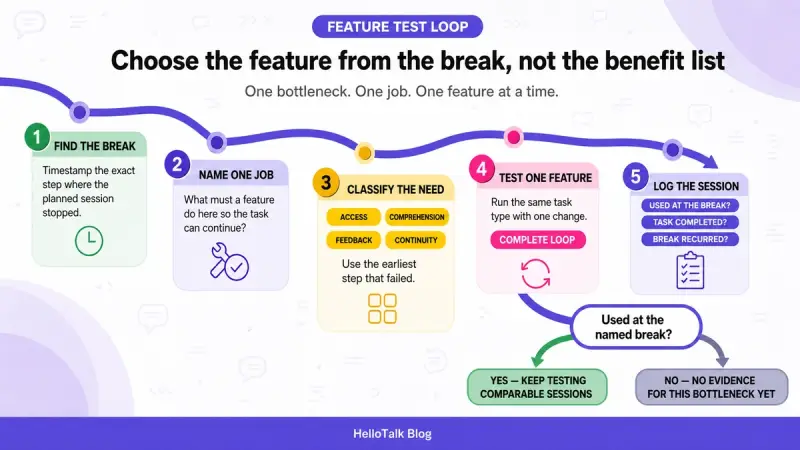
Here is the way out of the list and into a decision. Start with the exact point where your current practice loop breaks, then define the one job a paid feature would need to do there. The rest of this article applies that sentence step by step: find the break, name the job, sort it into one of four need classes, test the feature inside one complete loop, and write down what changed across comparable sessions. Only after that should you look at named features.

Find the Exact Point Where Your Current Practice Routine Breaks
Before you evaluate anything, run your normal sessions and change nothing except one thing: watch for the minute where the plan stops being the plan. Not the general feeling that the session went badly. The specific step where it stopped.
Take one concrete case. Sarah plans a twenty-minute listen-and-reply session. Around minute eight, a voice message contains a sentence she cannot parse. She leaves the conversation to look up words, comes back twelve minutes later, and never sends her reply. Her routine does not break at motivation or scheduling. It breaks at one sentence she could not follow, and everything after that minute is fallout.
That is the difference between a break and a mood. A break has a timestamp and a step: at minute eight, when the sentence arrived, I left the task. A mood sounds like "I never seem to get anywhere." Premium pages are very good at selling to moods, which is exactly why you should not shop with one. If you cannot yet point to the step where a session stopped, keep observing plain sessions until you can. The break is the whole foundation of this method, and it costs nothing to find.
One more note from experience: the first break you notice is often not the earliest one. If your session dies at the reply stage, check whether it was actually wounded earlier, at the point where you stopped following the input.
Turn Each Friction Point into One Job a Premium Feature Must Do
Once you have a timestamped break, translate it into a single sentence with this shape: at this exact point, the feature must do this specific thing so that the planned task continues.
For Sarah, that sentence is: "When a sentence stops me mid-conversation, the feature must show me what it means without my leaving the conversation." Notice what the sentence does not say. It does not say "help me improve listening" or "make practice easier." Those are wishes, and wishes match every feature on every premium page. A job matches very few features, which is the point.
Hold yourself to one job per friction point. If your sentence needs the word "and," you have two friction points, and they deserve two separate sentences. Deal with the earliest one first, because a session that breaks at the start never reaches the later problems at all.
This job sentence becomes your filter for everything that follows. When you eventually read a feature list, you are no longer asking whether something sounds useful. You are asking whether it performs your sentence. Most features will not, and crossing them off quickly is the first real payoff of the method.
Separate Access, Comprehension, Feedback, and Continuity Needs
Job sentences are easier to write when you can sort your break into a rough family first. Access, comprehension, feedback, and continuity are four practical ways to describe where a practice loop may break. These are editorial categories for organizing a personal decision, not a complete taxonomy of learning problems, so treat them as sorting bins rather than science.
The table below connects each family to what the break tends to look like mid-session and the kind of job sentence it usually produces. Read it row by row and find the one that matches the timestamped break you found earlier.
| Need class | What the break looks like in a session | The job it usually produces |
|---|---|---|
| Access | The session cannot start or continue because a limit is reached | Remove the specific limit that stops this session |
| Comprehension | The session stalls because you cannot follow something | Make that exact material followable without leaving the task |
| Feedback | You finish, but never learn what to fix before the next attempt | Deliver usable correction between this attempt and the next |
| Continuity | Each session restarts from zero instead of building on the last one | Carry what happened today into tomorrow's starting point |
Access breaks deserve one extra note, because they are the easiest to misread. If a session cannot start at all, whether the limit sits at content, at a tool, or at finding someone to practice with, no downstream feature ever gets tested, so an access job always comes first in order.
One break can also look like it belongs to two families. Sarah's stalled reply could read as a feedback problem, but the loop actually failed earlier, at comprehension. When in doubt, file the break under the earliest step that failed. The family you choose shapes which part of a premium page is even worth reading, so getting it roughly right saves a lot of scrolling.
Check Whether the Feature Changes Your Practice or Only Adds Convenience
Now you can look at a candidate feature, and this is where most decisions quietly go wrong. A feature can be convenient without changing the part of practice that keeps breaking. Convenience is not bad. It is simply a different purchase, and it deserves an honest label.
The test question is short. If this feature had existed in your last broken session, would the break itself have gone differently? Be strict about the answer. "The session would have felt smoother" is convenience. "The reply would have had a fair chance to continue" is change. For Sarah, a feature that translates the sentence inside the conversation is worth testing. A feature that makes the interface nicer around the same untranslated sentence is not, however pleasant it might be.
There is nothing wrong with paying for comfort, and plenty of learners knowingly do. The only mistake is paying for comfort while believing you bought a fix for the break, because the break will still be waiting at the same minute of your next session. Keep the two purchases separate in your head, and let your job sentence, not the feature's own description, decide which one you are actually making.
Test the Feature Inside One Complete Practice Loop
A feature that survives the convenience question still has to earn its place in a real session. Test one feature inside the same kind of complete practice loop and record the task attempted, the interruption, whether the feature was used, and whether the planned task was completed. This is a short personal observation, not an experiment, and it needs no lab conditions. It needs one honest, ordinary session.
A complete loop means the whole planned task, start to finish: the same kind of task where the break originally appeared, run all the way through rather than sampled in a demo. Trying a feature on a random snippet tells you how the feature demos. Running it inside the loop that keeps failing tells you whether it meets your break at the exact step where your job sentence lives.
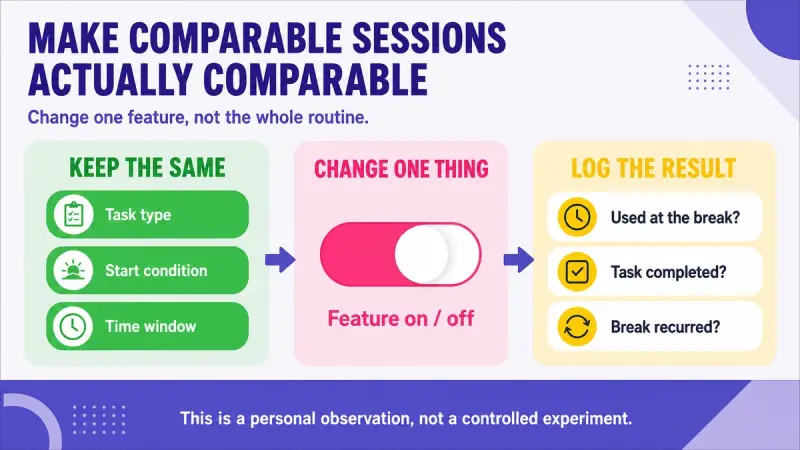
Test one feature at a time. If you switch two things on at once and the session improves, you have learned nothing about either. Keep the sessions reasonably comparable: the same task type, a similar length, ideally a similar time of day. There is no universal correct duration. Comparable simply means that if the old interruption wanted to show up again, it would have had a fair chance to.
Record What Changes Across Comparable Practice Sessions
Write the log down rather than relying on memory; a few lines per session are enough. The table below lists the five fields worth recording and what each one can and cannot tell you. The right column matters as much as the left, because the most common logging mistake is not missing data, it is over-reading the data you have.
| Field | What it can tell you | What it cannot tell you |
|---|---|---|
| Planned practice task | Keeps the comparison tied to one concrete action | That this task is the best one for learning |
| Exact interruption | Which step stopped or delayed the task | Anything clinical or psychological about you |
| Feature used at that step | That the tool was actually tested, not just owned | That having the tool caused later behavior |
| Task completed or not | A direct outcome for this session | That your language improved or a habit formed |
| Same interruption on a comparable session | Whether the original problem came back | A universal verdict about the product |
Once the original interruption has had a fair chance to recur across comparable sessions, apply one narrow rule. If you did not use the feature at the named interruption, the test has not shown that the feature addresses that bottleneck. That does not make the feature useless or badly built, and it says nothing about other learners. It means your evidence, for your break, is still missing, and a decision made anyway is a guess with a receipt.
Compare Named Premium Features Only After You Know Your Bottleneck
This article has deliberately named no apps and no plans, because a named list read before you know your break turns straight back into the premium page you started with. Once you have a job sentence and a few honest log lines, the list finally becomes useful, since you now know what to look for in it.
When you reach that point, compare named premium features by practice job, feedback or access format, and limitation in the companion piece on what premium language app features help you practice more often. That page holds the named lineup; this one stays method-only on purpose, so the two do not blur into each other.
Frequently Asked Questions About Choosing Premium Features
My routine breaks at more than one point. Which one do I test first? The earliest one in the loop. Later breaks are often fallout from the first: a session that stalls at comprehension never gets a fair chance to fail at feedback. Fix or rule out the earliest break, then re-observe, because the later breaks sometimes move or disappear.
How many comparable sessions do I need before deciding? Enough that the original interruption had a fair chance to recur across comparable sessions of the same task type. There is no fixed number, because this is a personal observation rather than an experiment. Stop when the log answers your one question: did the feature get used at the break, and did the task complete?
The feature helped, but not at the break I named. Should I keep it? That is a convenience result, and it is fine as long as you label it honestly. Either rewrite your job sentence to match what the feature actually did for you, or accept that you are paying for comfort while your named break is still unsolved and still needs its own candidate.
Should I check free features before choosing a paid one? It is worth checking free features first. Your break may already be covered by something you have not switched on, and testing free options first sharpens your job sentence at zero cost. Where a platform documents its own split, read it; for one example, see the separate HelloTalk free and VIP breakdown.
What if the real problem is the whole app, not one feature? A feature-level test may be too narrow, and you should step up one level. If every family in the need-class table seems broken at once, the mismatch is probably between you and the tool itself, and it is worth the time to compare language learning apps by goal before spending anything on features.
Can this method tell me whether a feature will improve my language level? No, and be suspicious of anything that claims it can this quickly. The log records session outcomes: whether the planned task was completed and whether the interruption recurred. It cannot prove learning gains or lasting habit change. Keep your conclusions the same size as your evidence.
If the loop you keep testing ends with a real conversation, you can run the same comparable-session log inside HelloTalk and watch exactly where your own routine holds, breaks, or finally completes.