
How to Delete Your HelloTalk Account (Step by Step, 2026)
You opened HelloTalk months ago, had a few conversations, then life got busy. Now the notifications feel like clutter and you want the account gone for good. Maybe you are switching apps, cleaning up your phone, or you just want your data off the platform. Whatever the reason, deleting your account should take about a minute once you know where the button lives.
This guide walks through the exact steps on both iOS and Android, explains what actually gets removed, and gives you the one honest fact most other guides skip: on HelloTalk, deletion is permanent. There is no grace period and no reactivation button. That matters, so read the recovery section before you tap confirm.
Before You Delete: Read This First
Deleting is final. According to HelloTalk's own support pages, deleted accounts cannot be restored. There is no 30-day recovery window like some social apps offer, and there is no "reactivate within X days" option. Once you confirm, the account is gone and you would have to start a brand new one from scratch.
That is the single most important thing to understand here, so here is a quick checklist to run through before you commit:
-
Save any contacts you care about. If you have language partners you actually talk to, exchange another way (email, another messaging app) before deleting, because you lose access to those chats.
-
Cancel your VIP subscription separately. Deleting the app or the account does not automatically stop an active subscription billed through the App Store or Google Play. You cancel that in your store settings, not inside HelloTalk.
-
Export anything you want to keep. Corrections native speakers left on your posts, voice messages, saved vocabulary, all of it disappears with the account.
If any of that gives you pause, you might want to just log out instead. HelloTalk does not currently offer a separate "deactivate" mode, but logging out keeps everything intact and you can return whenever you like without losing a thing.
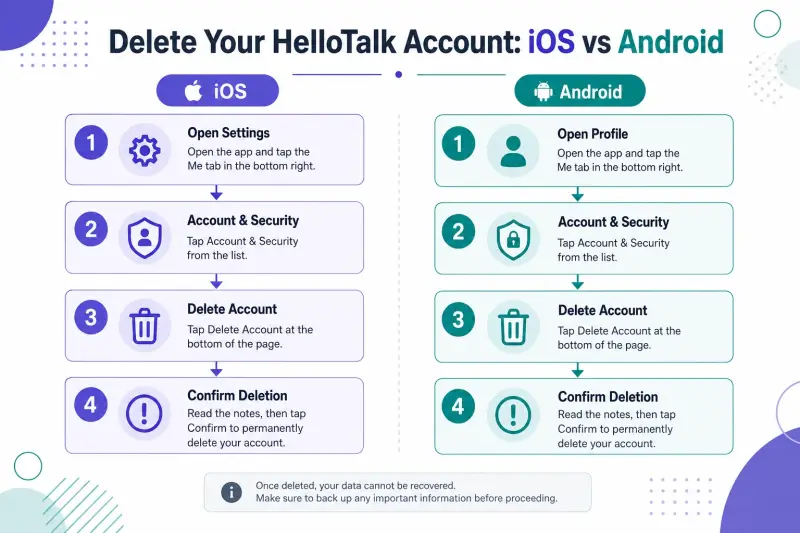
How to Delete Your HelloTalk Account on iOS
The steps are identical whether you are on an iPhone or iPad. From inside the app:
-
Tap the Me tab in the bottom navigation bar.
-
Tap the gear icon in the upper-right corner to open Settings.
-
Open the Account page.
-
Scroll to the bottom and tap Delete Account.
-
Read the confirmation notice, which reminds you the account cannot be restored, then confirm.
That is it. The account is removed once you confirm. If you still have an active VIP subscription, head to your iPhone Settings, tap your Apple ID, then Subscriptions, and cancel HelloTalk there so you are not billed again.
How to Delete Your HelloTalk Account on Android
Android follows the same path inside the app:
-
Tap the Me tab.
-
Tap the gear icon in the top-right to open Settings.
-
Go to Account.
-
Tap Delete Account at the bottom of the page.
-
Confirm when prompted.
To stop any recurring VIP charge on Android, open the Google Play Store app, tap your profile icon, go to Payments and subscriptions, then Subscriptions, and cancel HelloTalk. Do this whether or not you delete the account, because store subscriptions live outside the app.
What Actually Happens When You Delete
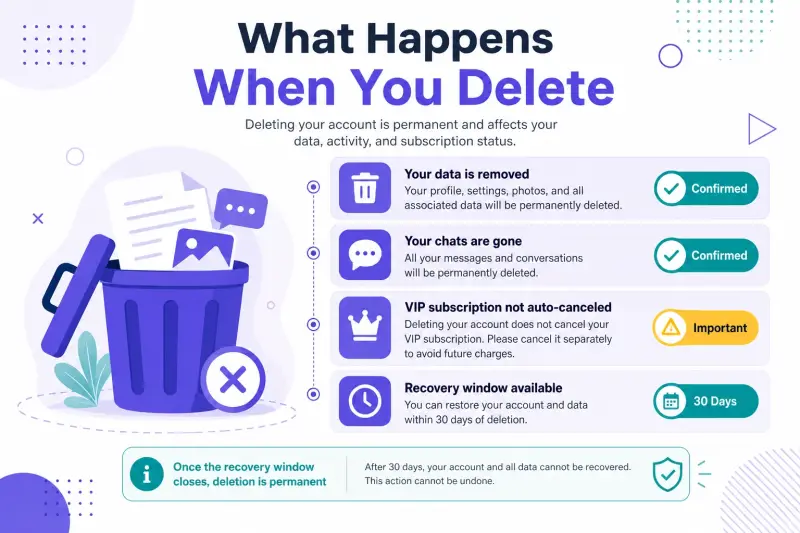
Here is a clear breakdown of what stays and what goes, so there are no surprises.
| Item | What happens on deletion |
|---|---|
| Your profile and username | Removed; the username may not be reusable |
| Chat history with partners | Deleted and unrecoverable |
| Corrections and posts on Moments | Deleted from your account |
| Saved vocabulary and study data | Deleted |
| VIP subscription billing | Not affected; cancel separately in your app store |
| The account itself | Permanent; no recovery window |
The takeaway is simple. Everything tied to your identity on the platform goes away, but your store-level subscription is a separate contract you have to handle yourself.
Can You Recover a Deleted HelloTalk Account?
No. This is where HelloTalk is stricter than many apps. There is no recovery window, no reactivation link in an email, and support cannot restore a deleted account. If you change your mind later, your only option is to create a fresh account and rebuild your profile, partners, and study history from zero.
Because of that, a lot of people who are only stepping away for a while are better off logging out rather than deleting. You keep your streak, your corrections, and your partner connections, and you can come back on your schedule.
What You Would Miss (An Honest Look)
We are not going to pretend deletion is a non-event, because for active learners it removes something useful. HelloTalk connects you with native speakers across 200+ countries and 260+ languages, and that pool of real people is the reason many learners choose it over a solo drills app in the first place.
If your goal was to actually speak the language, the loss is not the app itself but the practice loop. Trading messages with a native speaker, getting your grammar corrected in real time, dropping into a Voiceroom to listen and talk, that is the part that moves you from studying a language to using it. Before you delete, it is worth being honest with yourself about whether the app failed you or whether you just never built a routine. A structured plan like a 30-minute daily English speaking practice routine can turn a dormant account into a working one.
If you are leaving because HelloTalk was not the right fit, that is completely fair. It helps to know what else is out there. Our ranked guide to English speaking practice apps compares how much you actually talk on each option, and if budget is the issue, the roundup of free English speaking apps shows which ones get you talking without a subscription. For a candid look at HelloTalk specifically, including where it falls short, read our honest HelloTalk review before you decide for good.
The Case for Logging Out Instead
Logging out costs you nothing and undoes nothing. Your profile, chats, corrections, and study progress all wait for you. You stop the notifications by turning them off in your phone settings, and the account sits quietly until you want it back.
The whole point of a language exchange app is the human connection, and those connections take time to build. If there is any chance you will return to language learning this year, a log out preserves that groundwork. Deletion throws it away. Choose deletion only when you are certain you are done.
On the platform side, the same loop can include joining Livestreams when you want a slightly more guided room, and checking one line with AI pronunciation scoring or AI grammar notes before you hit send without changing this article's theme.
If you are still deciding whether to leave, the HelloTalk review and language exchange overview help you weigh the alternative rather than deleting on impulse.
If you are still deciding whether to leave, the HelloTalk review, the language exchange overview, and the English speaking practice apps pages help you weigh staying for speaking practice rather than deleting on impulse.
Frequently Asked Questions
How do I delete my HelloTalk account permanently? Open the app, tap Me, then the gear icon, then Account, then Delete Account at the bottom, and confirm. The steps are the same on iOS and Android. Deletion is permanent as soon as you confirm.
Can I recover my HelloTalk account after deleting it? No. HelloTalk does not offer a recovery window or reactivation. Deleted accounts cannot be restored, and your only path back is to create a new account from scratch.
Does deleting the app also delete my account? No. Removing the app from your phone only uninstalls the software. Your account, profile, and any active subscription remain until you delete the account inside the app and cancel the subscription in your app store.
Will deleting my account cancel my VIP subscription? No. VIP subscriptions are billed through the App Store or Google Play and are managed there. Cancel the subscription in your store settings separately, or you may keep getting charged.
Is there a way to hide or deactivate my account instead of deleting it? HelloTalk does not currently offer a separate deactivate mode. The reversible option is simply to log out, which keeps all your data and lets you return anytime.
What happens to my chats and corrections when I delete? They are deleted along with the account and cannot be recovered. If any corrections or voice messages matter to you, save them before you delete.
Delete Cleanly, Cancel the Store Too
Deleting your HelloTalk account takes under a minute, but it cannot be undone, so make the choice deliberately. If you are truly finished, follow the steps above and cancel any subscription in your app store. If you are only stepping back, log out and keep your progress. And if you are open to giving speaking practice one more honest try, you can explore what HelloTalk offers before you close the door for good.