
Unwanted Contact on HelloTalk: When to Stop, Block, and Report

You correct someone's sentence about their weekend, and the next message is about your photo. Then comes a question about which city you live in, then three more messages before you have typed anything at all. The language practice has stopped, and now you are working out how polite you have to be before you are allowed to leave.
You do not owe a warning, an explanation, or one more polite reply before you stop talking to someone on HelloTalk. Blocking, keeping a record, and reporting are three separate actions, and they do not have to happen in that order. You can block first and think about a report afterwards, or block and never report at all.
You Can End a Conversation Without Giving a Warning
Language exchange can create a quiet sense of obligation. Someone spent twenty minutes fixing your paragraph, so going quiet when their messages turn personal can feel rude, even when the discomfort is entirely reasonable.
Being friendly in a chat is not agreement to flirting, to sharing photos, or to answering questions about your home, your schedule, or your relationship status. If someone treats a polite reply as permission, that is their misreading, not your mistake. Nothing about a language exchange requires you to explain why you are leaving, to offer a second chance, or to send one last message so the exit feels fair to the other person.
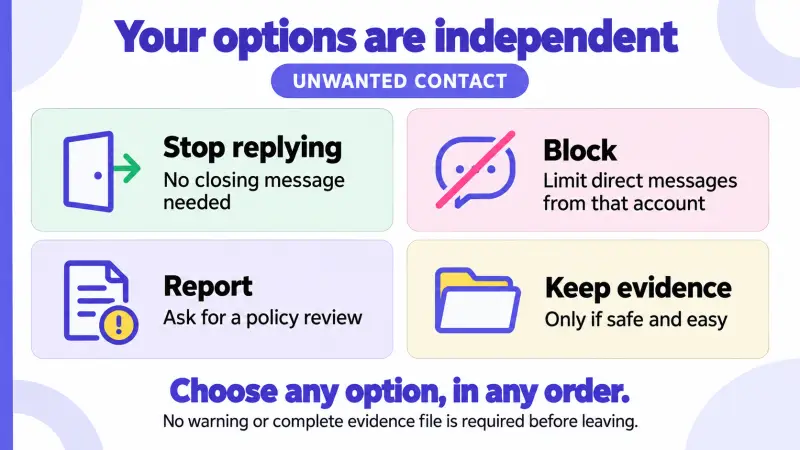
In practice, that means you can put the phone down in the middle of a thread and leave it there. You do not have to work out whether your reaction was proportionate before you protect your own space. Stopping early is a normal use of a chat app, not an overreaction that needs justifying.
What to Save Before Blocking or Reporting
Keeping evidence can support a report, but it is optional, and HelloTalk treats blocking and reporting as separate actions rather than steps that depend on each other. If rereading the messages makes you feel worse, skip this part and block.
If you do feel able to keep a record and can do so safely, HelloTalk's published reporting guidance suggests submitting the relevant conversation along with the report. The useful details are small and specific:
- The account name and profile link of the person involved
- The messages themselves, or screenshots of them
- Roughly when they arrived, especially if the behavior repeated over several days
- Where it happened, if it was not a private chat
Keep that record private and send it through the official reporting flow. Posting screenshots publicly or naming the person in a Moments post can conflict with HelloTalk's rules against sharing other people's private information without permission, and it can expose more details about you and about third parties than you intended.
How to Report the Message, Post, or Room Where It Happened
HelloTalk provides separate reporting entry points for private messages, Moments posts and comments, group chats, Voicerooms, and livestreams, so the report generally starts in the place where the behavior happened.
The table below is a quick way to decide where to begin and what is worth noting while you are still on that screen. It describes documented routes rather than button names, since labels shift between app versions.
| Where the behavior happened | Where the report starts | Worth noting, if safely available |
|---|---|---|
| A private chat | The chat settings, or the sender's profile menu | The messages and roughly when they arrived |
| A Moments post or comment | The post or the comment itself | Which post it was, and the account that wrote it |
| A group chat | The group's settings and report option | The group name, plus the message that prompted it |
| A Voiceroom or livestream | The reporting entry point for that room or stream | The room name, the approximate time, and the account |
| The account as a whole | The profile menu | The username and a short summary of the pattern |
Live audio is worth a second thought, because a room name and a rough time can be harder for you to reconstruct afterwards than a chat you can scroll back through. Noting those details gives your report something concrete to point at, though only if you can do it without staying in a situation you want to leave. Leaving right away is always a valid choice. For private chats, HelloTalk's guide to blocking and reporting a user describes reaching the report option through chat settings or the profile menu, and recommends including the relevant conversation.
What HelloTalk Says Happens After a Report
Once the report is submitted, the waiting is the uncomfortable part, so it helps to know what HelloTalk actually describes.
HelloTalk states that reporting or blocking someone does not send that person a notification, although a blocked sender who tries to message you again can see that the message was not delivered. There is no announcement of your report, but a persistent sender may still work out that something changed. Plan around what you want to stop, rather than around staying invisible.
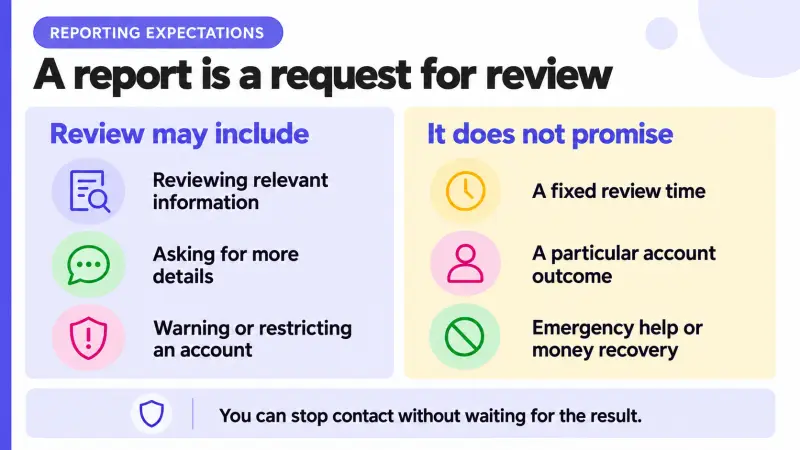
HelloTalk's published block-and-report guidance describes a safety team that reviews reports, may request additional information, and can warn or restrict accounts when the evidence shows a policy violation, without stating a review time or a guaranteed outcome. Anyone who tells you in advance that a specific account will be banned is guessing. The review process is described in HelloTalk's explanation of what happens after you report someone.
Reports are also not the only mechanism in play. The HelloTalk safety page describes a combination of technology, human moderation, and community reports, along with rules against harassment, impersonation, scams, and sharing other people's private information without permission. Policy violations can lead to content removal or account restrictions. None of that makes any platform risk-free, and none of it replaces your own decision to end a conversation early.
What to Do If the Unwanted Contact Continues
Sometimes messages start again from an account you do not recognize, with a different photo and familiar phrasing. You are not expected to investigate who is behind it. Similar wording or a reused picture does not establish that two accounts belong to the same person, so report the behavior you can actually see on the new account, and if you suspect a connection to an earlier report, say so as a possibility rather than as a fact.
This can also be a reasonable moment to tighten what a stranger can learn about you without asking. Recent Moments may show a workplace logo, a school name, a street sign, or a repeating weekly schedule, and profiles often name a city. A short guide to what stays private during a language exchange covers which details a practice partner genuinely needs and which ones they do not.
If the contact moved to another app, HelloTalk's tools still act on the HelloTalk account, and HelloTalk's content rules say information from other platforms or from offline situations may be taken into account when deciding on restrictions. You can report the HelloTalk account, include relevant context privately through the official flow when you can obtain it safely, and use the other service's own reporting and blocking tools for what happened there. No platform can investigate everything said elsewhere or control another company's app.
Keep the difference between urgency levels clear. If you believe you are in immediate physical danger, or a threat sounds urgent, contact local emergency services. Threats that are ongoing but not immediate, stalking, or contact that follows you offline are reasons to involve local authorities or a trusted local support service. Context matters when you judge which situation you are in: someone naming your city can be unsettling on its own, and it reads very differently when it arrives alongside a threat or repeated attempts to locate you. A platform report is a moderation request, not an emergency response, and it is not a way to recover money or force contact to stop everywhere.
None of this obliges you to keep practicing on a schedule you no longer want. Continuing, pausing for a while, or changing how you practice are all your call, and one bad thread does not undo the progress you made. If you decide to pick it back up, joining a Voiceroom on HelloTalk as a silent listener is one low-pressure way back in, since you can hear a conversation in your target language without speaking or messaging anyone.
Frequently Asked Questions
Do I have to report someone before I can block them?
No. Blocking and reporting are separate actions on HelloTalk, and either can be used on its own. Blocking restricts direct messages from that account to you, while reporting asks HelloTalk's safety team to review the conduct. You can do one, both, or neither, since neither is a precondition for the other. Neither one can guarantee that a determined person will not appear again under a new account or in a public space.
Will the other person find out that I blocked or reported them?
HelloTalk states that it does not notify anyone that they have been reported or blocked. However, a blocked sender who tries to send a new message can see that the message was refused. So HelloTalk does not announce your decision, though silence and a failed message can still be noticed. Treat blocking as a way to stop direct contact, not as a way to stay undetectable.
What kinds of behavior can I report?
HelloTalk's reporting guidance covers accounts that use the platform only for flirting or sexual content, harassment and abusive messages, and publishing someone else's personal information without consent. HelloTalk's content rules also cover impersonation, scams, and spam. Not every clumsy or awkward message is a rule violation, and you are still free to block anyone for any reason, reportable or not.
How long does a report take, and will the account be removed?
HelloTalk's published block-and-report guidance does not state a fixed review time or a guaranteed result. It says the safety team reviews the report, may ask for more information, and may warn or restrict the account when the evidence supports a violation. So there is no reason to wait for an outcome before protecting yourself. Block, adjust what you share, and decide for yourself whether to keep practicing, pause, or switch to a format that feels calmer.
Can I report someone if the conversation moved to another app?
You can report the HelloTalk account, including the messages where the person pushed you to move elsewhere, and HelloTalk's content rules say information from other platforms or offline may be considered when restrictions are decided. What happens inside another app is handled by that service, so use its reporting and blocking tools as well. Send any screenshots through those official channels rather than posting them publicly, and you can stop responding on both sides while it is being handled.