
What Should You Keep Private During a Language Exchange?

A partner fixes three of your sentences, explains why one of them sounded stiff, and the conversation finally feels useful. Then a different kind of message arrives: which neighborhood do you live in, and can you send a photo of where you work? Saying no feels ungrateful right after someone helped you. Answering feels like handing over more than a grammar correction was worth.
The way through that hesitation is not to work out whether the person can be trusted, because a chat window will not tell you. It is a smaller question you can actually answer: does this detail help me practice?
What a Language Partner Needs to Know, and What They Do Not
Useful language feedback comes from what you are trying to say, not from where you live, so a correction works without your address, your employer, or your daily schedule. Someone can rewrite your self-introduction, catch a mistranslated idiom, or tell you that your phrasing sounds like a textbook, all without knowing your street or your surname. Mentioning your target language, your level, or the situations you want to handle often makes the feedback more specific, and that remains your choice rather than a requirement.
Deciding this one message at a time is easier than deciding in the abstract, so the table below sets several requests you may run into against what the practice itself needs. Read it as a decision aid for a single message, not as a verdict on the person asking.
| Detail someone might ask for | What practice actually requires | A lower-risk way to answer |
|---|---|---|
| Your city or neighborhood | A time zone, so you can agree on a practice window | Name the country or time zone, not the district |
| Your school or workplace | Your topic needs, such as job interviews or lab reports | Describe the field, not the organization |
| Your phone number or messaging ID | A place to exchange messages, which the chat already provides | Keep the thread where it started |
| Photos of your home, commute, or documents | Something to talk about in the target language | Send a photo of a book page, a meal, or a view without landmarks |
| When you are usually alone at home | A repeatable weekly slot | Offer a general window, such as weekday evenings |
| Bank, payment, or investment details | Nothing at all | Stop the topic and treat it as unrelated to learning |
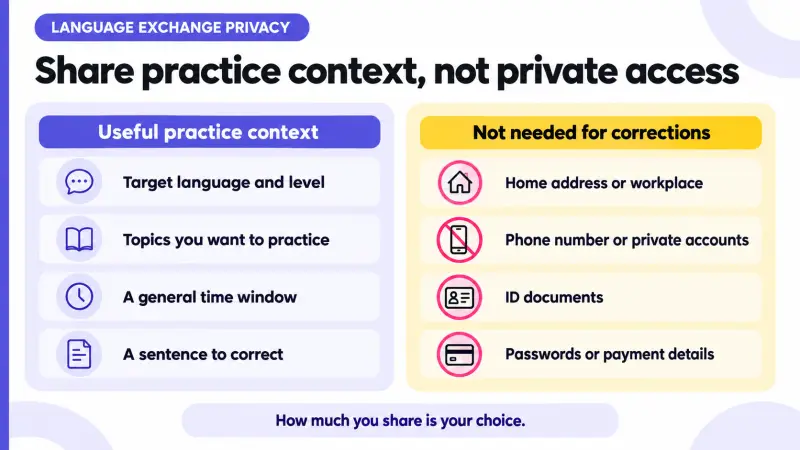
None of those answers require you to end the conversation. Each one offers to keep practicing while leaving out the part that has nothing to do with language. What you type is only half of it, though, because images carry details of their own.
What Your Photos and Moments Can Reveal
A photo or a Moments post can carry details you never typed, including street signs, station names, school uniforms, building entrances, package labels, and the hours you are reliably free. One picture of your desk can show a company badge. A post published every weekday at the same hour describes a routine.
The HelloTalk platform hosts Moments as a public community feed, and that visibility is what makes it useful for learning: you write a few sentences and several native speakers can correct them. It also means a post is not a private message to one partner. Before publishing, it helps to crop the edges, leave out anything with a name or a number printed on it, and write about a trip after you are home rather than while you are standing there.
No privacy setting on any app can guarantee that a photo or message you have already sent is not screenshotted, saved, or re-shared. Deleting your copy later does not pull back a copy someone else made. That is why the decision that matters happens before you send, since that moment is the one fully in your hands. How much you post, and how often, stays your call.
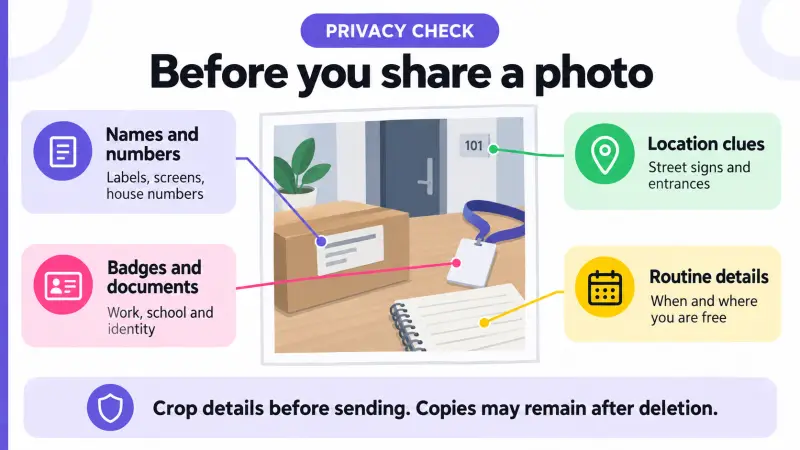
Images give things away passively. A direct request for your contact details is the same question asked out loud.
How to Respond to Requests for Your Number or Social Accounts
People ask to move a conversation off the app for many different reasons, and you will not be able to tell which one applies from a few messages. What you can observe is the effect. Once the conversation moves to a private messaging service or a social account, your practice sits next to your personal profile on that service, and the tools you had in the chat no longer apply there in the same way.
Protecting your personal information and requests to move a conversation to another platform both appear on the HelloTalk safety page among the situations HelloTalk asks learners to slow down for. Slowing down is enough. You do not need a policy citation to decline.
Three replies that keep the practice and skip the handover:
"I keep language practice in the app so my corrections stay in one place. Happy to keep going here."
"I don't share my number, but I'm free to chat on Wednesday evenings if that works for you."
"Let's keep it here for now. Can you check whether this paragraph sounds natural?"
You do not need to explain, justify, or apologize for keeping a detail private, and you do not need to end the practice to protect it. If the request repeats after a clear answer, or turns into pressure, the next step is covered in the guide on ending unwanted contact and reporting it. If a contact request is quickly followed by a link, a payment request, or an investment tip, that is a separate situation handled in what to do when a language partner asks for money.
Sometimes the detail is already out, because someone else posted it.
What to Do If Someone Shares Your Private Information
If your photo, screenshot, name, or contact details turn up in a post, a comment, or a group chat, you are not obliged to argue about it in public, and you do not have to reply at all.
Reporting starts where the content appears, and HelloTalk's documented guidance describes different entry points for different places. A private chat or a user account is reported through the chat settings or the profile menu, with the relevant conversation submitted as evidence. A Moments post or a comment is reported on that post or comment. A group chat goes through the group's own settings. A voice room or a livestream has its own report option inside the room. Labels and placement vary between app versions, so the route matters more than an exact button name.
Saving a screenshot, filing a report, and blocking the account are three independent choices. You can do all three, one of them, or none, in whatever order suits you. Evidence can help a review, but you never have to stay in contact, keep a thread open, or assemble a complete record before you leave. Whatever you do keep belongs in an official report rather than in a public post about the person.
HelloTalk's content policy prohibits sharing another person's private information without permission, and HelloTalk can restrict content or accounts when a review finds a policy violation. HelloTalk describes technology, human moderation, and community reports working together behind that process. The HelloTalk guidance described here does not promise a fixed processing time or a specific outcome for an individual case, so a report is best understood as a request for review.
If the information also appears on a different service, removal there is a question for that service, since HelloTalk acts on accounts and content on its own platform. HelloTalk's content policy does say that relevant information from outside the platform may be taken into account, so what happened elsewhere can still be worth including in a report.
Account security steps are worth matching to what was actually exposed. A name or a photo becoming visible is not the same as a password leak. Change your passwords and switch on two-step verification where your accounts offer it if you shared a password or a login code, if credentials you reuse elsewhere were exposed, or if you notice sign-ins you do not recognize. You can also review what your own posts and profile currently show, while remembering that a review does not erase copies other people already saved.
How to Keep Practicing Without Sharing More
After an uncomfortable exchange, continuing, pausing, and stopping are all reasonable. If you do want to keep practicing, the examples below work without sharing sensitive personal details.
Corrections work well on shared material: a paragraph you wrote about your weekend, a news headline you both read, a photo of a menu, a recording of you reading five sentences aloud. HelloTalk's voice rooms let you join and listen first, then decide whether you want to speak. A standing weekly topic gives a partnership somewhere to go without anyone tracking where you are. If you would rather build a new partner list with these limits in place from the first message, the guide on meeting language partners online covers how to open conversations that stay on topic.
The chat corrections, public Moments posts, and voice rooms described here all sit inside HelloTalk, which is also where its blocking and reporting tools apply.
Frequently Asked Questions
What personal information should I keep private on a language exchange app?
Your home address, exact neighborhood, workplace or school name, phone number, identity or travel documents, and any financial or payment details. Useful language feedback does not require any of them. Sharing your target language, your level, or the topics you want to practice usually makes corrections more specific, and that is still a choice you get to make.
Is it rude to say no when a language partner asks for my phone number?
No. Declining a contact request is a normal boundary, and a short answer such as "I keep practice in the app" needs no further explanation. The other person is not obligated to keep replying, and neither their patience nor their irritation tells you whether they are trustworthy. You can decline the request either way.
Can a photo I sent in a chat be saved by the other person?
Yes. Any photo or message you send can be screenshotted, photographed with another device, or saved before you delete it, and no app setting can guarantee otherwise. Decide what you are comfortable with before sending, and be careful with images showing documents, badges, house numbers, or street signs.
What does HelloTalk say about someone posting my private information?
HelloTalk's content policy prohibits sharing another person's private information without permission, and HelloTalk can restrict content or accounts when a review finds a violation. HelloTalk describes technology, human moderation, and community reports working together, and its policy allows relevant information from outside the platform to be considered. The HelloTalk guidance reviewed here does not promise a fixed processing time or a specific outcome for an individual report.
I already shared my full name and city. What should I do now?
Sharing a name and a city does not by itself mean an account was compromised. You can decide what you want to share from here, review what your own posts and profile currently show, and leave out further details. Change passwords if you also shared a password or a login code, if credentials you reuse were exposed, or if you see sign-ins you do not recognize. If the messages turn into pressure, requests for money, or contact on other services, blocking and reporting the account are available to you at any point.