
Account
I forgot my password. How can I reset it?
You can reset your password by clicking "Forgot Password" on the login page. Next, follow the steps to reset your password and use your new password to log back in.
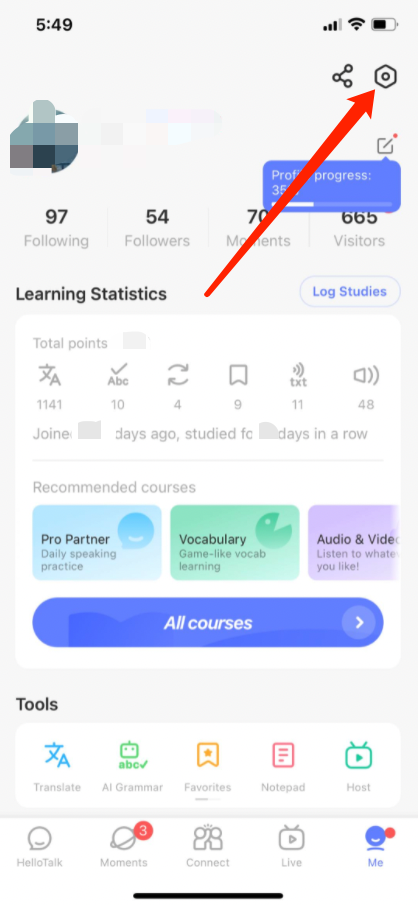
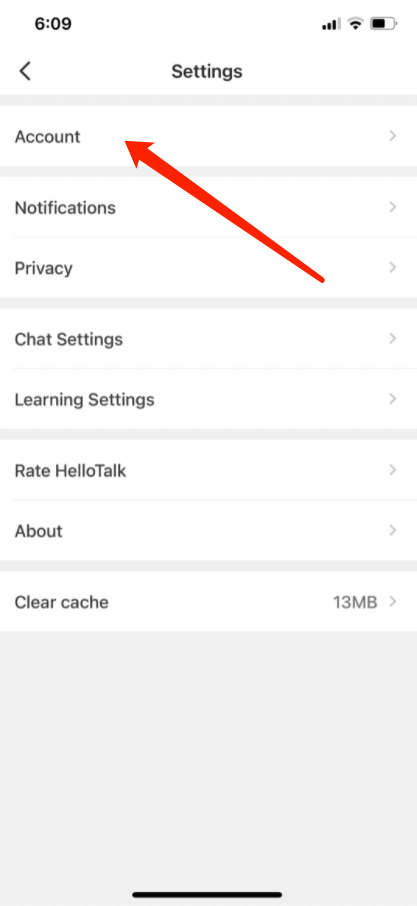
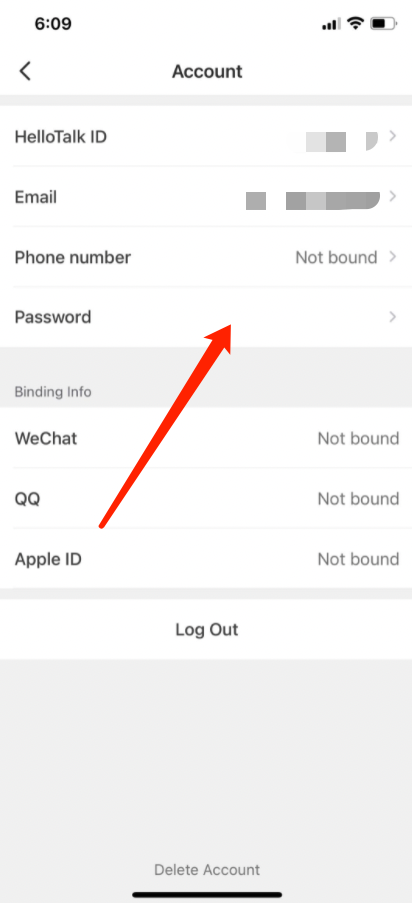
If you've already logged in, you can reset your password by following these steps:
-
Go to the "Me" tab to view your profile
-
Go to "Settings" by tapping the gear icon in the upper-right corner
-
Go to the "Account" page
-
Click on "Password" to reset your password
Note: If your registration email address is invalid or incorrect, please change it first by going to "Me" > "Settings" > "Account" > "Email", and then reset your password
Questions connexes
- →How do I create an account and/or log in to HelloTalk?
- →I forgot my password and cannot log in, what can I do?
- →I can't log in using Apple ID, Google or Facebook account, what can I do?
- →I deactivated my Apple ID, Google or Facebook account linked to my HelloTalk account, can I still log in?
- →I received the notice "This phone number is already bound to an account" when signing up for a new account, but I have forgotten
Last updated on