
Thai Learning Apps Compared: Which One Helps You Sound Right?
Thai Learning Apps Compared: Which One Actually Teaches You to Sound Right?
If we have shopped around for a Thai app, we have seen the same promises everywhere: learn Thai fast, thousands of words, smart review. So we download one, grind through hundreds of lessons, then try to order food in Bangkok and the server tilts their head. We knew the word. We just said it on the wrong pitch.
Here is the honest finding after looking at how these tools actually perform for beginners. Most Thai apps are genuinely good at vocabulary and grammar, but no standalone app reliably corrects an individual learner's tone, because tone accuracy is a feedback problem, not a content problem. And tone is the part that decides whether a Thai person understands us.
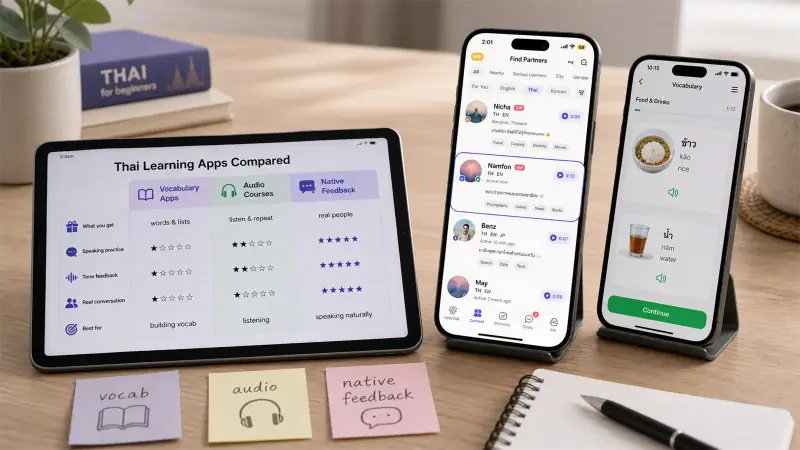
AppBest atCorrects your individual tone?CostDuolingoDaily habit and starter vocabularyNoFree, Premium optionLingThai script and everyday phrasesNo live feedback on your voicePaid, free trialPimsleurSpeaking out loud, rhythmNo, audio is pre-recordedPaid, free trialDropsFast, visual vocabularyNoFree, Premium optionBusuuStructured lessons plus community correctionsPartial, text and async onlyFree, Premium optionHelloTalkReal native feedback on your actual voiceYes, via real speakers and AI scoringmost core features available for free
Let us give credit first. Duolingo is great for building a daily streak and a starter vocabulary, and that consistency matters. Ling is one of the more Thai-focused options, taking the script seriously where many apps skip it. Pimsleur is audio-first and pushes us to speak out loud, which is good for rhythm. Drops makes vocabulary fast and visual. Busuu adds a nice twist, letting native speakers correct our written and spoken exercises after the fact.
If our goal is to recognize words, read a little script, and build a base, any of these moves us forward.
Before choosing among them, it helps to identify what these apps assume you already know.
Now the uncomfortable part. None of these apps can reliably tell us whether our specific tone was right, in the moment, in a way it can explain.
Think about what tone correction actually requires. We say a syllable, and something has to judge the exact pitch contour we produced against what a native speaker expects, then tell us precisely what slipped. A pre-recorded lesson cannot do that, because it never hears us. A multiple-choice quiz cannot, because tone is not a tapping exercise. Even pass-or-fail speech recognition usually cannot explain that our falling tone started too high.
So we land in a quiet trap. The app says we are doing great, the word count climbs, and the whole time we are practicing the wrong pitch into permanent memory. We only find out months later, when a real Thai person cannot understand us. The deeper reason this happens is covered in our guide to Thai tones for beginners.
The missing piece is a human ear. A Thai speaker can hear our rising tone come out flat and tell us in five seconds, in a way no lesson plan can. The question is how to get that feedback without paying a tutor for every practice session.
This is where HelloTalk sits differently in the comparison. It is not trying to be a better flashcard app. It is a language exchange platform with 70M+ registered users, built so we practice with real Thai speakers who are learning our language in return. It was named Google Play's Best Social App in 2017, and 90% of its core features are completely free, so real feedback is not locked behind a paywall.
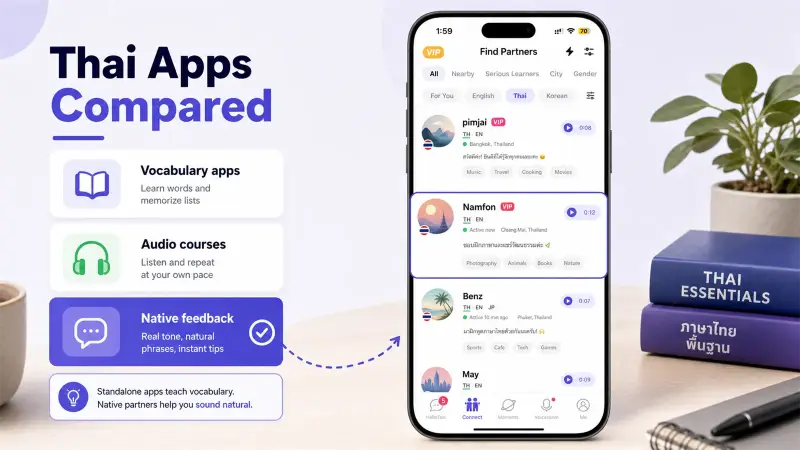
Here is how its parts cover the gap the other apps leave open:
The difference is not that HelloTalk has more lessons. It puts real, interactive feedback and human ears into the loop, which is the exact part the other apps cannot cover.
The smartest setup is a pair, not a single winner. Use a structured app like Duolingo or Ling to build the habit, the script, and the base vocabulary, then use HelloTalk for the real tone feedback those apps cannot give, ideally from the first week so we never bake in the wrong pitch. The full beginner sequence is in how to start learning Thai.
Comparing Thai apps on word counts misses the question that actually matters for beginners: which approach gets a real Thai speaker to tell us, today, whether our tone was right. No standalone app does that well, because it is a human feedback problem.
So keep the study app and add real native interaction on top. Open HelloTalk, find a Thai partner, and send one voice message. The correction we get back will teach us something no lesson screen ever has.