
Account
How do I change my user ID?
-
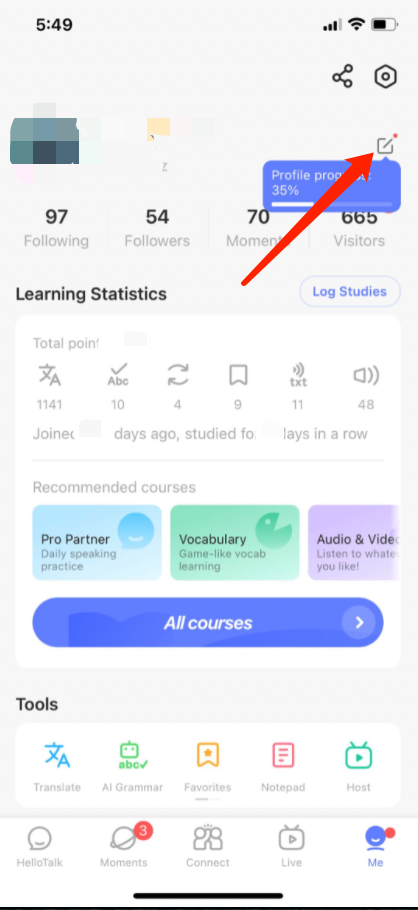
Go to the "Me" tab to view your profile
-
Click on the ">" icon in the lower-right corner of your profile picture
-
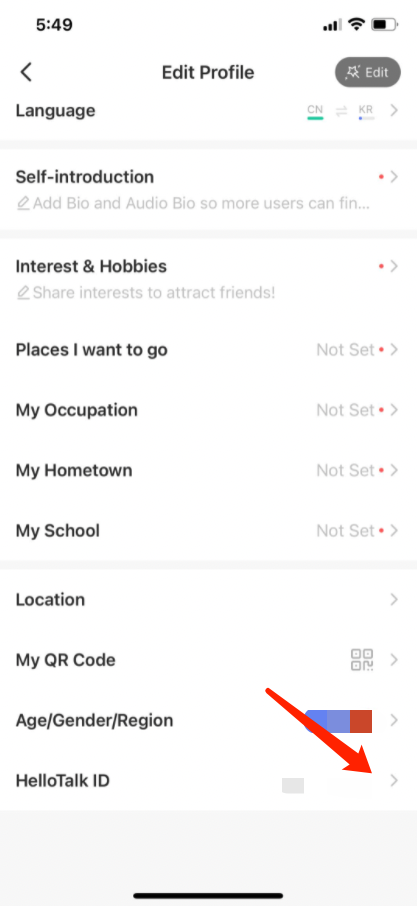
Tap "HelloTalk ID" at the bottom of the page to change it
Please note that we only allow a one-time change in case someone makes a mistake. This is to prevent abuse.
সম্পর্কিত প্রশ্নসমূহ
- →How do I create an account and/or log in to HelloTalk?
- →I forgot my password and cannot log in, what can I do?
- →I can't log in using Apple ID, Google or Facebook account, what can I do?
- →I deactivated my Apple ID, Google or Facebook account linked to my HelloTalk account, can I still log in?
- →I received the notice "This phone number is already bound to an account" when signing up for a new account, but I have forgotten
Last updated on